# Edge Styles Guide

> Learn about the different edge styles and how to interpret their visual meaning in Meshery's component relationships.

---

LLMS index: [llms.txt](/llms.txt)

---

In Meshery, the line that connects [components](/concepts/logical/components/) is called an **edge**. Each edge visually represents a [relationship](/concepts/logical/relationships/) and uses a specific style to communicate its nature.

This guide helps you interpret the most common edge styles you will encounter.

### Interpreting Common Edge Styles

Meshery uses a set of default visual styles to provide at-a-glance information about the type of connection an edge represents. While these styles can be customized in the UI, understanding the defaults is key to interpreting component relationships.

#### Line Style: The Primary Indicator

The line style is the most important visual cue for understanding an edge's purpose.

- **Dotted Line**:
  - **What it means**: A **semantic relationship**. This represents a real, functional connection that Meshery understands and can manage, such as a network link or a volume mount.
  - **When you'll see it**: These lines indicate active relationships between components, showing how they interact and communicate. The dotted pattern represents dynamic connections, while arrowheads show the direction of data flow or dependency.

- **Solid Line**:
  - **What it means**: A **non-semantic annotation**. This is a visual note or organizational aid for human interpretation only. Meshery's engine ignores these connections.
  - **When you'll see it**: These lines represent static or conceptual relationships between components. They help visualize structural connections or highlight specific component groupings without implying active data flow.

#### Color: A Secondary Cue

Color provides an additional hint about an edge's nature.

- **Green / Teal**:
  - This is the default color for **non-semantic annotations**, helping them stand out from functional connections.

- **Blue / Grey**:
  - These are the typical default colors for **semantic relationships**.

### Edge Style Gallery

The following gallery showcases the full range of visual styles available for edges in Meshery.

<style>

    .extension-guides-container {
      display: flex;
      flex-wrap: wrap;
      gap: 20px;
      justify-content: space-between;
      margin-top: 2rem;

    }
    .extension-guide-card {
       display: flex;
     flex-direction: column;
       max-width: 20rem;
       max-height: 30rem;
       gap: 1rem;
  }
    .extension-guide-svg-container {
       height: auto;
       display: flex;
       flex-direction: column;
       align-items: center;
       gap: 0.455rem;
     flex-basis: 30%;
  }
    .extension-guide-svg-container img {
     width: 50%;
     height: auto;
  }
    .extension-guide-details {
       display: flex;
       flex-direction: column;
       flex-basis: 77%;
       gap: 10px;
     text-align: center;
  }
    @media (max-width: 767px) {
      .extension-guides-container {
        flex-direction: column;
      }
      .extension-guide-svg-container {
        gap: 0.3rem;
      }
      .extension-guide-svg-container img {
        width: 40%;
      }
      .extension-guide-card {
        max-width: 30rem;
        flex-direction: column;
      }
     }
  </style>


<div class="extension-guides-container">


    <div class="extension-guide-card">
      <div class="extension-guide-svg-container">
        
          <img src="/images/shapes/ArrowHead.svg" alt="Arrow Head">
        
        <div style="text-align:center;">Arrow Head</div>
      </div>
      <div class="extension-guide-details">
        
          <div>Represents general direction or flow in diagrams. In UML, it could indicate direction in an association or dependency.</div>
        
      </div>
    </div>
  
    <div class="extension-guide-card">
      <div class="extension-guide-svg-container">
        
          <img src="/images/shapes/BezierCurveLine.svg" alt="Bezier Curve Line">
        
        <div style="text-align:center;">Bezier Curve Line</div>
      </div>
      <div class="extension-guide-details">
        
          <div>Used for curved relationships, which might indicate non-linear or non-direct connections. In UML, it could be used for inheritance or flow that isn&#39;t straightforward.</div>
        
      </div>
    </div>
  
    <div class="extension-guide-card">
      <div class="extension-guide-svg-container">
        
          <img src="/images/shapes/FilledCircleHead.svg" alt="Filled Circle Head">
        
        <div style="text-align:center;">Filled Circle Head</div>
      </div>
      <div class="extension-guide-details">
        
          <div>Used for aggregation in UML, where one class contains another but does not own it (e.g., a library containing books).</div>
        
      </div>
    </div>
  
    <div class="extension-guide-card">
      <div class="extension-guide-svg-container">
        
          <img src="/images/shapes/FilledDiamondHead.svg" alt="Filled Diamond Head">
        
        <div style="text-align:center;">Filled Diamond Head</div>
      </div>
      <div class="extension-guide-details">
        
          <div>Used for aggregation in UML, typically an empty diamond at the container end, indicating a &#34;whole-part&#34; relationship.</div>
        
      </div>
    </div>
  
    <div class="extension-guide-card">
      <div class="extension-guide-svg-container">
        
          <img src="/images/shapes/FilledSquareHead.svg" alt="Filled Square Head">
        
        <div style="text-align:center;">Filled Square Head</div>
      </div>
      <div class="extension-guide-details">
        
          <div>Represents composition in UML, a stronger relationship than aggregation, where the contained class cannot exist without the container (e.g., a house and its rooms).</div>
        
      </div>
    </div>
  
    <div class="extension-guide-card">
      <div class="extension-guide-svg-container">
        
          <img src="/images/shapes/FilledTriangleHead.svg" alt="Filled Triangle Head">
        
        <div style="text-align:center;">Filled Triangle Head</div>
      </div>
      <div class="extension-guide-details">
        
          <div>Often used for inheritance in UML, where one class is a subclass of another. It indicates the &#34;is-a&#34; relationship.</div>
        
      </div>
    </div>
  
    <div class="extension-guide-card">
      <div class="extension-guide-svg-container">
        
          <img src="/images/shapes/LineWithCircles.svg" alt="Line With Circles">
        
        <div style="text-align:center;">Line With Circles</div>
      </div>
      <div class="extension-guide-details">
        
          <div>Often represents a weak or indirect association in UML. It can also be used for dependencies or indicating optional relationships.</div>
        
      </div>
    </div>
  
    <div class="extension-guide-card">
      <div class="extension-guide-svg-container">
        
          <img src="/images/shapes/SmoothLineWithCircle.svg" alt="Smooth Line With Circle">
        
        <div style="text-align:center;">Smooth Line With Circle</div>
      </div>
      <div class="extension-guide-details">
        
          <div>Represents a smooth transition or flow between elements. It could be used in scenarios where gradual change or influence is depicted.</div>
        
      </div>
    </div>
  
    <div class="extension-guide-card">
      <div class="extension-guide-svg-container">
        
          <img src="/images/shapes/StraightLine.svg" alt="Straight Line">
        
        <div style="text-align:center;">Straight Line</div>
      </div>
      <div class="extension-guide-details">
        
          <div>Represents a simple association or direct relationship between two entities or classes in UML.</div>
        
      </div>
    </div>
  
    <div class="extension-guide-card">
      <div class="extension-guide-svg-container">
        
          <img src="/images/shapes/TreeLine.svg" alt="Tree Line">
        
        <div style="text-align:center;">Tree Line</div>
      </div>
      <div class="extension-guide-details">
        
          <div>Represents hierarchical relationships, such as a parent class with child classes, or a main system branching into subsystems.</div>
        
      </div>
    </div>
  
    <div class="extension-guide-card">
      <div class="extension-guide-svg-container">
        
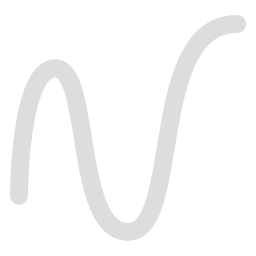
          <img src="/images/shapes/WaveLine.svg" alt="Wave Line">
        
        <div style="text-align:center;">Wave Line</div>
      </div>
      <div class="extension-guide-details">
        
          <div>Typically used to represent asynchronous signals or connections that aren&#39;t continuous. It may also denote complex relationships or uncertain flows in certain custom diagrams.</div>
        
      </div>
    </div>
  
    <div class="extension-guide-card">
      <div class="extension-guide-svg-container">
        
          <img src="/images/shapes/ZigzagLine.svg" alt="Zigzag Line">
        
        <div style="text-align:center;">Zigzag Line</div>
      </div>
      <div class="extension-guide-details">
        
          <div>This is often used to represent signals with interference or noise. In system design, it can be used to indicate a disrupted or unreliable connection.</div>
        
      </div>
    </div>
  
</div>