GitOps with Meshery
Meshery publishes two GitHub Actions that you can add to any workflow:
- Kanvas Snapshot renders your Kubernetes manifests, Helm chart, or Docker Compose file as a Meshery Design and comments the image on pull requests that change those files, so reviewers see the change before it merges.
- Performance Testing with Meshery deploys Meshery in the runner, runs a performance test against your service, and records the results, so you catch latency and throughput regressions before they ship.
Render a snapshot on pull requests
The Kanvas Snapshot action needs a Layer5 Cloud API token and a GitHub token that can comment on pull requests. Store the Layer5 Cloud token as a repository secret, for example MESHERY_TOKEN.
The action runs helper scripts from its own repository, so the workflow checks that repository out into an action folder next to yours. The workflow below runs on pull requests that change files under deploy/:
name: Kanvas Snapshot
on:
  pull_request:
    paths:
      - "deploy/**"

jobs:
  snapshot:
    runs-on: ubuntu-latest
    # Pull requests from forks get no repository secrets, so skip them.
    if: github.event.pull_request.head.repo.full_name == github.repository
    permissions:
      contents: read
      pull-requests: write
    steps:
      - uses: actions/checkout@v4
      - uses: actions/checkout@v4
        with:
          repository: layer5labs/kanvas-snapshot
          path: action
      - name: Render snapshot
        uses: layer5labs/kanvas-snapshot@master
        with:
          githubToken: ${{ secrets.GITHUB_TOKEN }}
          mesheryToken: ${{ secrets.MESHERY_TOKEN }}
          prNumber: ${{ github.event.pull_request.number }}
          application_type: "Kubernetes Manifest"
          filePath: "deploy"
Set application_type to Kubernetes Manifest, Helm Chart, or Docker Compose to match what filePath points at. When filePath is a folder, the action merges only the .yaml and .yml files directly inside it and skips subfolders, so point it at the folder that holds your manifests.
GitHub does not pass repository secrets to workflows that pull requests from forks trigger, so the if condition skips those runs instead of letting them fail. To render a design that already exists in Meshery, pass its ID as designID instead. To snapshot a Helm chart from your terminal instead of a workflow, see the Helm Snapshot plugin.
Both examples reference the actions’ master branch. To keep a later change to an action from changing your pipeline, pin each uses: line to a commit SHA you have tested.
Run a performance test in your pipeline

The Performance Testing with Meshery action starts Meshery in the runner, runs your test, and records the result in your Meshery account. Trigger it on releases, on every pull request, or on any other workflow event.
- Get a provider token. In Meshery UI, open the avatar menu and choose Get Token, then copy the value of the
tokenkey from the downloadedauth.json. Store it as a repository secret namedPROVIDER_TOKEN. - Commit a test configuration file in Cloud Native Performance (SMP) format to your repository’s
.githubfolder, as shown below, and pass its file name asprofile_filename. - Add the action to a workflow:
name: Performance Test
on:
  push:
    branches:
      - master

jobs:
  performance-test:
    runs-on: ubuntu-latest
    steps:
      - uses: actions/checkout@v4
      - name: Run performance test
        uses: layer5io/meshery-performance-action@master
        with:
          provider_token: ${{ secrets.PROVIDER_TOKEN }}
          platform: docker
          profile_filename: perf-config.yaml
The action passes a test configuration file to mesheryctl perf apply --file, so the file uses the same structure and camelCase keys as mesheryctl. See Use a test configuration file:
test:
  smpVersion: v0.0.1
  name: Istio Performance Test
  clients:
    - loadGenerator: fortio
      protocol: http
      connections: 2
      rps: 10
      endpointUrls:
        - https://staging.example.com/
  duration: 30m
mesh: istio
Replace https://staging.example.com/ with the URL of the service to test. The runner must be able to reach it, so use a public or staging URL, or deploy the service in an earlier step of the same job. To set the URL per run instead, pass endpoint_url.
The action accepts these inputs:
| Input | Required | Purpose |
|---|---|---|
provider_token | Yes | The token value from your auth.json. |
platform | No | Where to deploy Meshery in the runner: docker (default) or kubernetes. |
profile_filename | One of these two | Name of an SMP test configuration file in .github. |
profile_name | One of these two | Name of a performance profile saved in Meshery. See the note below. |
endpoint_url | No | Overrides the endpoint in the test configuration, for example the URL of the service your workflow just deployed. |
service_mesh | No | Overrides the service mesh named in the test configuration. |
test_name | No | Overrides the test name. |
load_generator | No | Overrides the load generator. Meshery runs tests with fortio. |
When you pass profile_name, the action looks the profile up with mesheryctl perf view, a command that current releases of mesheryctl no longer have, so the step fails. Use profile_filename until the action is updated.
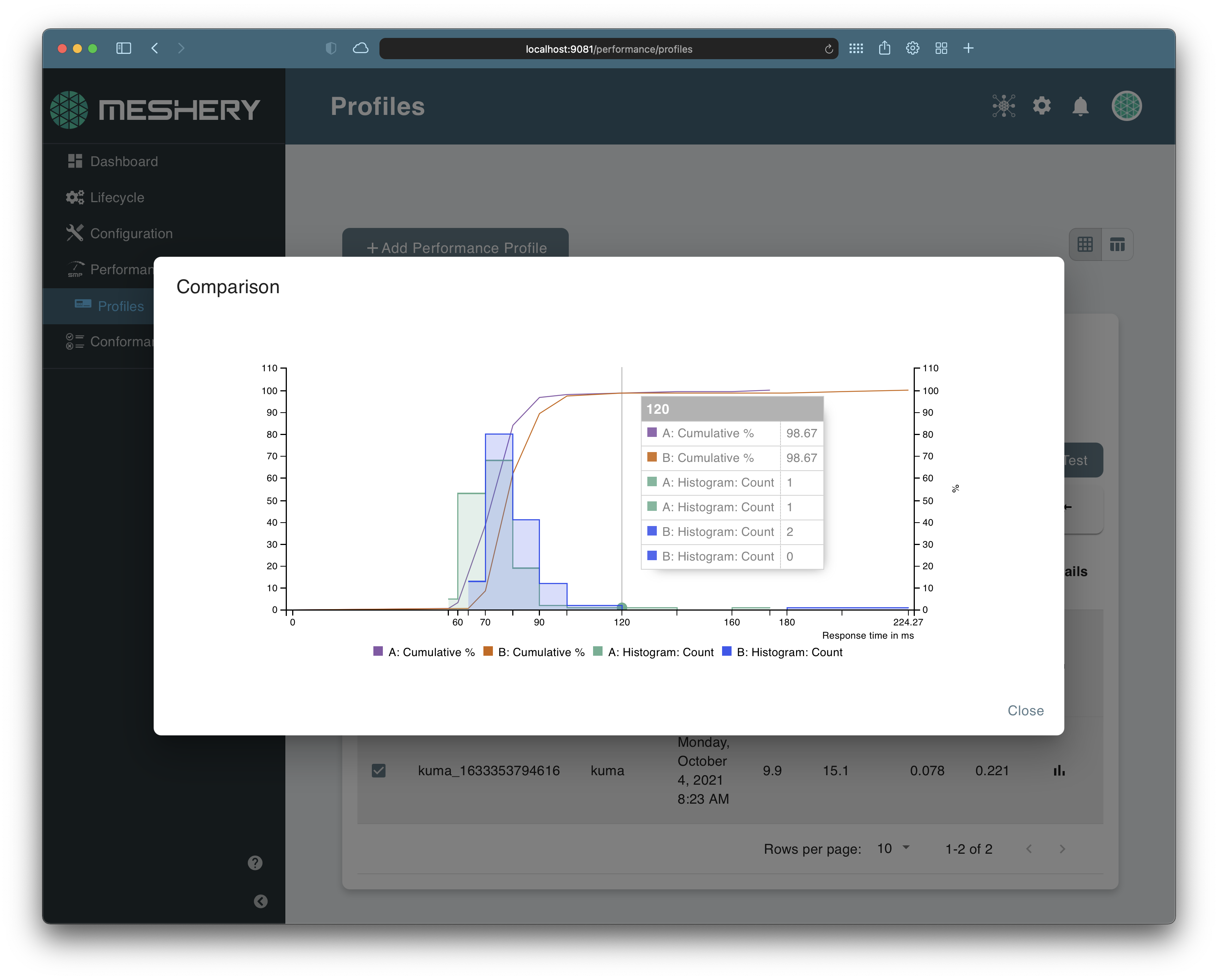
Meshery shows each run’s results under Performance → Profiles. To read them, see Interpreting Performance Test Results.