# Docker Extension

> Install Docker Extension for Meshery

---

LLMS index: [llms.txt](/llms.txt)

---

<h1>Quick Start with Docker Extension <img src="../images/docker.svg" style="width:35px;height:35px;" /></h1>

The Docker Extension for Meshery runs Meshery inside Docker Desktop, so you can use Meshery's collaborative cloud native management features right next to Docker Desktop's built-in Kubernetes.

## Prerequisites

- Docker Desktop 4.10 or later.
- Kubernetes enabled in Docker Desktop, using the kubeadm cluster type. If you use kind, see [Install on kind](/installation/kubernetes/kind/) instead.

## Install the Docker Meshery Extension

Install the extension in one of three ways:

- [Using Docker Desktop](#using-docker-desktop)
- [Using Docker Hub](#using-docker-hub)
- [Using Docker CLI](#using-docker-cli)

### Using Docker Desktop

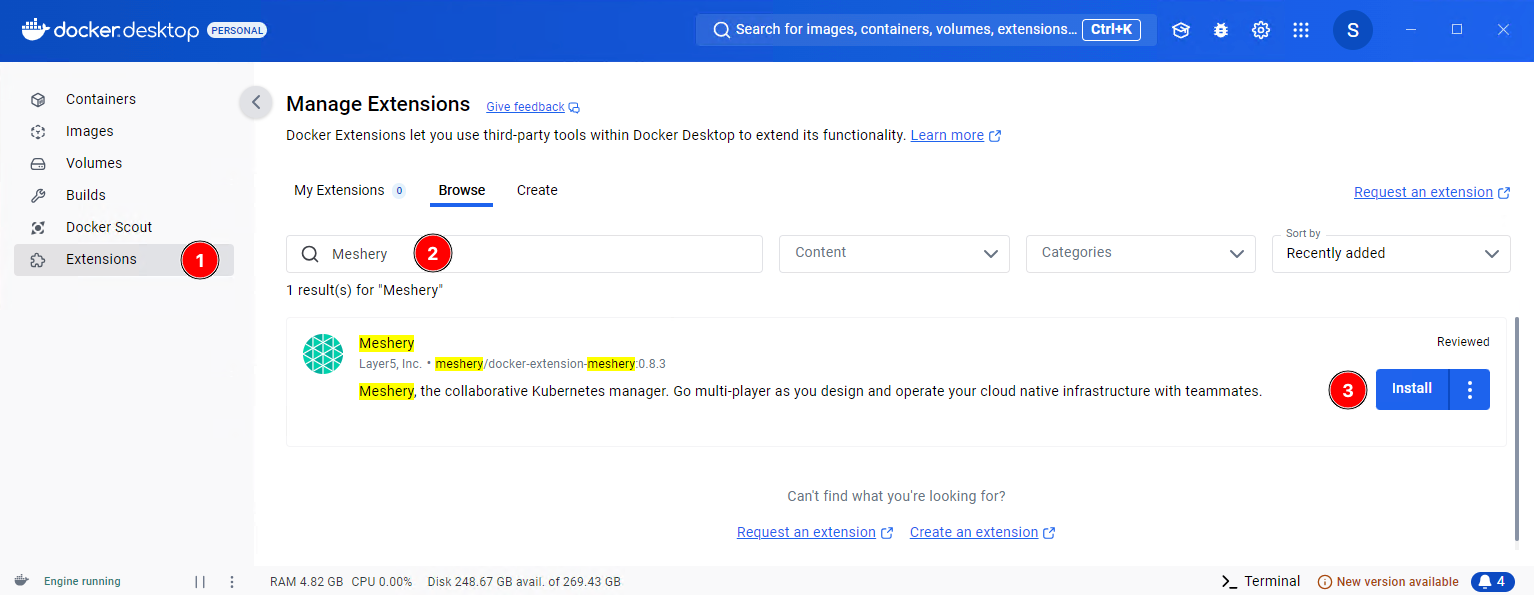
Open the **Extensions** marketplace in Docker Desktop, search for Meshery, and click **Install**.

[![Docker Meshery Extension Install](images/docker-desktop-meshery-extension-install.png)](images/docker-desktop-meshery-extension-install.png)
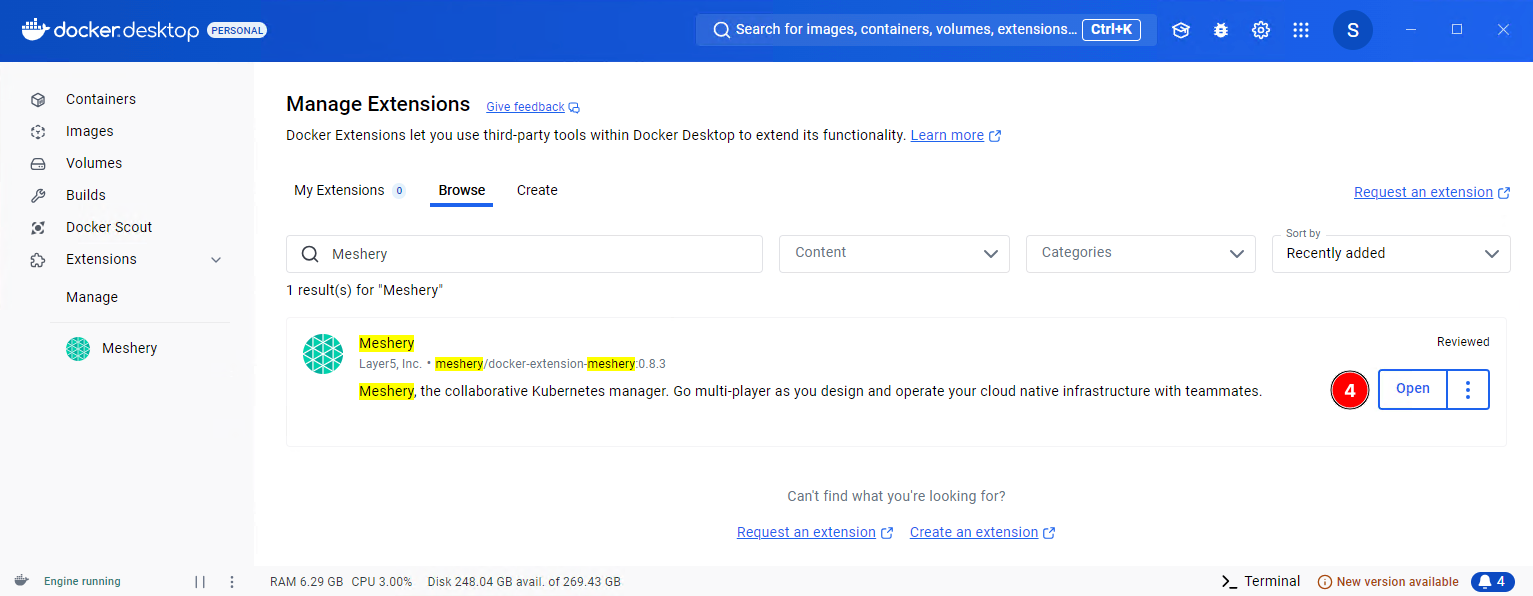
When the installation finishes, click **Open**, or click **Meshery** under **Extensions** in the left sidebar.

[![Docker Meshery Extension Open](images/docker-desktop-meshery-extension-open.png)](images/docker-desktop-meshery-extension-open.png)
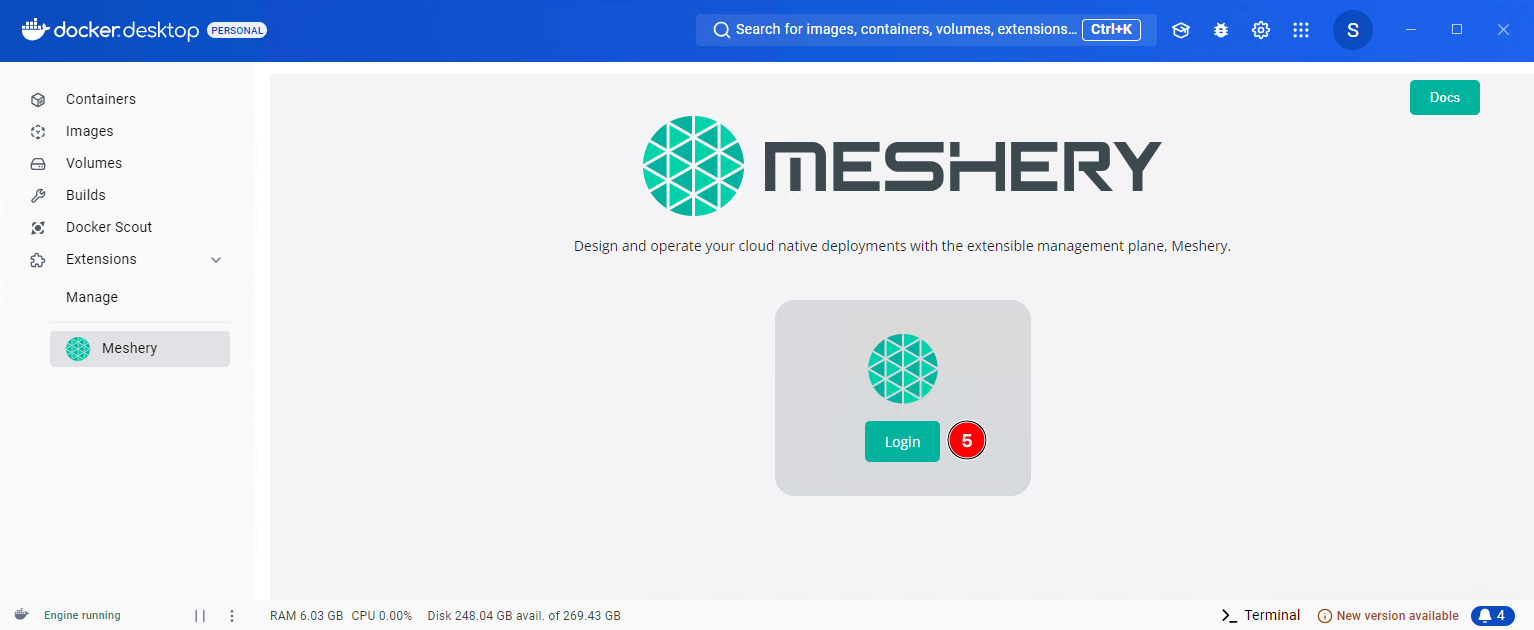
Click **Login** to open the _Meshery Cloud_ login page. Log in or sign up, and Meshery Cloud returns you to Docker Desktop. The extension always uses the Meshery Cloud Provider (`PROVIDER=Meshery`).

[![Docker Meshery Extension Login](images/docker-desktop-meshery-extension-login.png)](images/docker-desktop-meshery-extension-login.png)
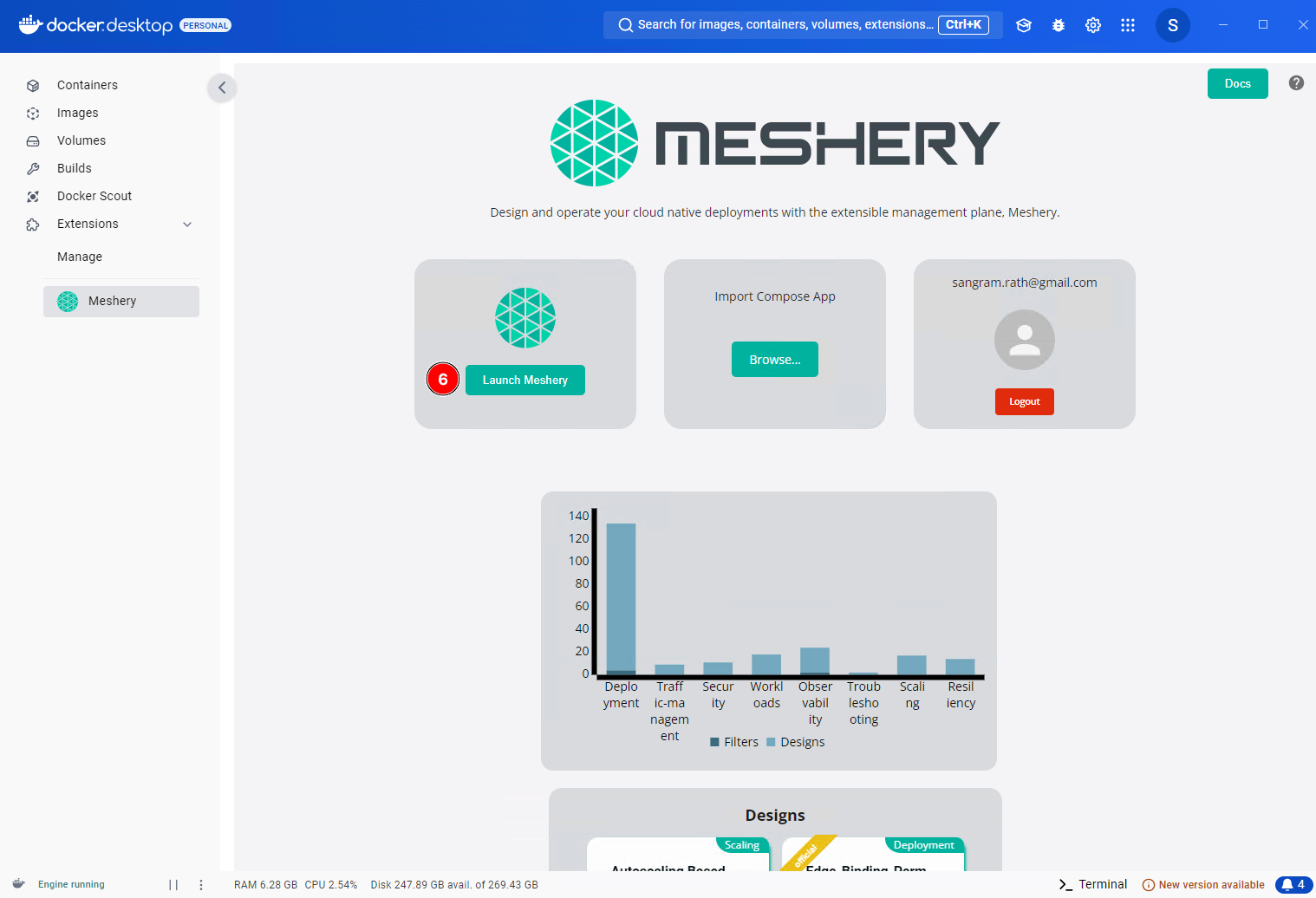
Finally, click **Launch Meshery** to open Meshery UI in a browser window. It runs at `http://localhost:9081/` by default.

[![Docker Meshery Extension Launch](images/docker-desktop-meshery-extension-launch.png)](images/docker-desktop-meshery-extension-launch.png)
You can also open `http://localhost:9081/` directly in a browser on the same machine and complete the _Meshery Cloud_ login there.

### Using Docker Hub

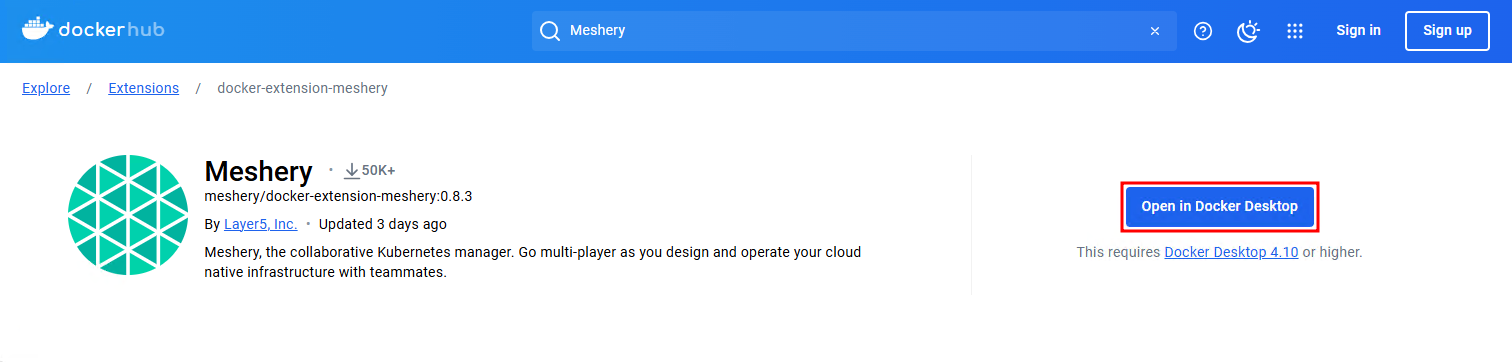
You can also install the extension from Docker Hub. Go to the [Meshery Docker Extension](https://hub.docker.com/extensions/meshery/docker-extension-meshery) page and click **Open in Docker Desktop**. After installation, the steps are the same as above.

[![Docker Hub Extension](images/docker-hub-meshery-extension.png)](images/docker-hub-meshery-extension.png)
### Using Docker CLI

To install the extension from the command line, run:

<!--
{% capture code_content %}docker extension install meshery/docker-extension-meshery{% endcapture %} -->
<!-- {% include code.html code=code_content %} -->

<pre class="codeblock-pre" style="padding: 0; font-size: 0px;">
  <div class="codeblock" style="display: block;">
    <!-- Updated style for clipboardjs -->
    <div class="clipboardjs" style="padding: 0; height: 0.5rem; overflow: hidden;">
      <span style="font-size: 0;">docker extension install meshery/docker-extension-meshery</span> 
    </div>
    <div class="window-buttons"></div>
    <div id="termynal2" style="width: 100%; height: 200px; max-width: 100%;" data-termynal="">
      <span data-ty="input">docker extension install meshery/docker-extension-meshery</span>
      <span data-ty="progress"></span>
      <span data-ty="">Successfully installed Meshery</span>
      <span data-ty="input">mesheryctl system dashboard</span>
    </div>
  </div>
</pre>

The extension runs as a set of containers inside your Docker Desktop virtual machine. You can now use Meshery to manage and monitor your cloud native infrastructure.

## Remove Meshery as a Docker Extension

Remove the extension from Docker Desktop or from the command line.

### Removing from Docker Desktop

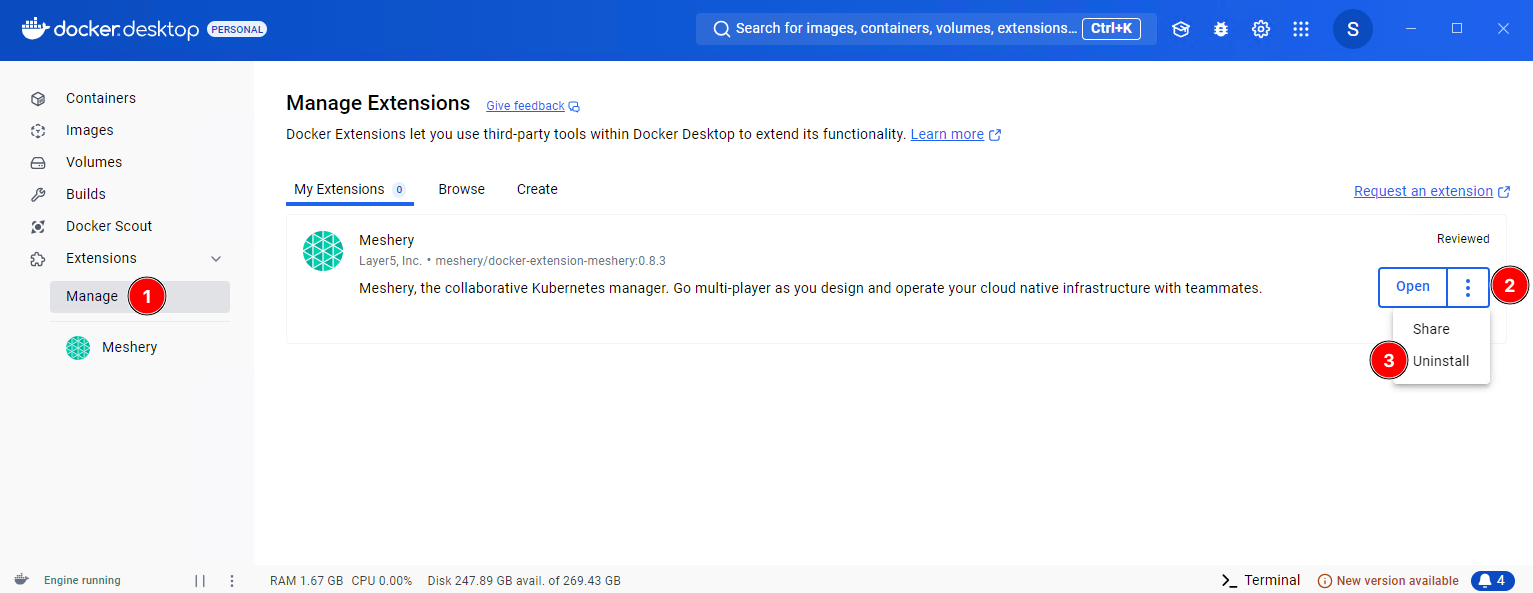
Go to **Manage** under **Extensions**, click the ellipsis button (three vertical dots), and select **Uninstall**.

[![Remove Meshery Docker Desktop Extension](images/docker-desktop-meshery-extension-remove.png)](images/docker-desktop-meshery-extension-remove.png)
### Removing using Docker CLI

To remove the extension from the command line, run `docker extension rm`:


<pre class="codeblock-pre">
	<div class="codeblock">
		<code class="clipboardjs">$ docker extension rm meshery/docker-extension-meshery</code>
	</div>
</pre>


### Additional Cleanup

Uninstalling the extension can leave images and networks behind. To remove them:

**Remove Meshery Images (if necessary)**

The extension pulls Docker images, and depending on how you configured Meshery, it may have pulled more. List your images with `docker images`, then remove each Meshery image you no longer need with `docker rmi`. For example:


<pre class="codeblock-pre">
	<div class="codeblock">
		<code class="clipboardjs">docker rmi meshery/meshery:stable-latest</code>
	</div>
</pre>


**Remove Meshery Docker Networks (if necessary)**

Meshery creates its own Docker networks, which can remain after you uninstall the extension. List them with `docker network ls`, then remove each one with `docker network rm`. For example:


<pre class="codeblock-pre">
	<div class="codeblock">
		<code class="clipboardjs">docker network rm meshery_default</code>
	</div>
</pre>


<script src="/js/terminal.js" data-termynal-container="#termynal2"></script>

<div class="related-discussions">
  <h3>Recent Discussions with "meshery" Tag</h3><ul><li>
          <a href="https://discuss.meshery.io/t/looking-for-a-meshmate-seeking-an-experienced-meshery-contributor-as-a-guide/8166" target="_blank" rel="noopener noreferrer">
            Looking for a MeshMate: Seeking an Experienced Meshery Contributor as a Guide
          </a>
        </li><li>
          <a href="https://discuss.meshery.io/t/looking-for-a-meshmate-frontend-backend-cloud-native-development/8161" target="_blank" rel="noopener noreferrer">
            Looking for a MeshMate — Frontend, Backend &amp; Cloud-Native Development
          </a>
        </li><li>
          <a href="https://discuss.meshery.io/t/request-for-a-meshmate-active-meshery-contributor/8158" target="_blank" rel="noopener noreferrer">
            Request for a MeshMate — Active Meshery Contributor
          </a>
        </li><li>
          <a href="https://discuss.meshery.io/t/bug-new-catalog-publish-request-email-renders-with-oversized-social-icons-and-squashed-content-on-mobile/8138" target="_blank" rel="noopener noreferrer">
            [Bug] &#34;New Catalog publish request&#34; email renders with oversized social icons and squashed content on mobile
          </a>
        </li><li>
          <a href="https://discuss.meshery.io/t/how-to-present-an-issue-pr-in-a-development-meeting-feedback-wanted/8107" target="_blank" rel="noopener noreferrer">
            How to Present an Issue/PR in a Development Meeting: feedback wanted
          </a>
        </li><li>
          <a href="https://discuss.meshery.io/t/newbie-here-excited-to-join/8052" target="_blank" rel="noopener noreferrer">
            Newbie here -- Excited to join
          </a>
        </li><li>
          <a href="https://discuss.meshery.io/t/play-meshery-io-is-down/8045" target="_blank" rel="noopener noreferrer">
            play.meshery.io is DOWN
          </a>
        </li><li>
          <a href="https://discuss.meshery.io/t/your-path-to-becoming-a-certified-meshery-contributor-starts-here/7652" target="_blank" rel="noopener noreferrer">
            Your Path to Becoming a Certified Meshery Contributor Starts Here
          </a>
        </li></ul><p>
    <a href="https://discuss.meshery.io/tag/meshery" target="_blank" rel="noopener noreferrer">
      View all discussions tagged with <code>meshery</code>
    </a>
  </p>
</div>