Upgrade Guide
Meshery is a composition of components that upgrade in a specific order: the CLI first, the Server second, and the components on managed clusters - Meshery Operator, MeshSync, and Broker - automatically, driven by the Server. You do not upgrade the Operator by hand. This page explains how the components version in relation to one another and walks through the upgrade procedure, verification, and rollback. For production practices (pinned versions, upgrade-friendly probes, rollback rehearsal), see the Operational Readiness Checklist.
Before you begin
- Note your release channel (
stablefor production;edgefor testing). - Record current versions so you can verify the upgrade:
mesheryctl version
kubectl -n meshery get deploy meshery-operator \
  -o jsonpath='{.spec.template.spec.containers[0].image}{"\n"}'
Upgrading Meshery CLI
Upgrade mesheryctl first. mesheryctl system update only updates Meshery
container images and manifests, not the CLI binary itself. The Meshery
command-line client is available in different package managers; use the
package manager you installed with.
Upgrading mesheryctl using Homebrew
brew upgrade mesheryctl
Upgrading mesheryctl using Bash
Upgrade mesheryctl on Mac or Linux with this script:
curl -L https://meshery.io/install | DEPLOY_MESHERY=false bash -
Upgrading mesheryctl using Scoop
scoop update mesheryctl
Upgrading Meshery Server, Adapters, and UI
Various components of Meshery will need to be upgraded as new releases become available. Meshery is comprised of a number of components including a server, adapters, UI, and CLI. As an application, Meshery is a composition of different functional components.
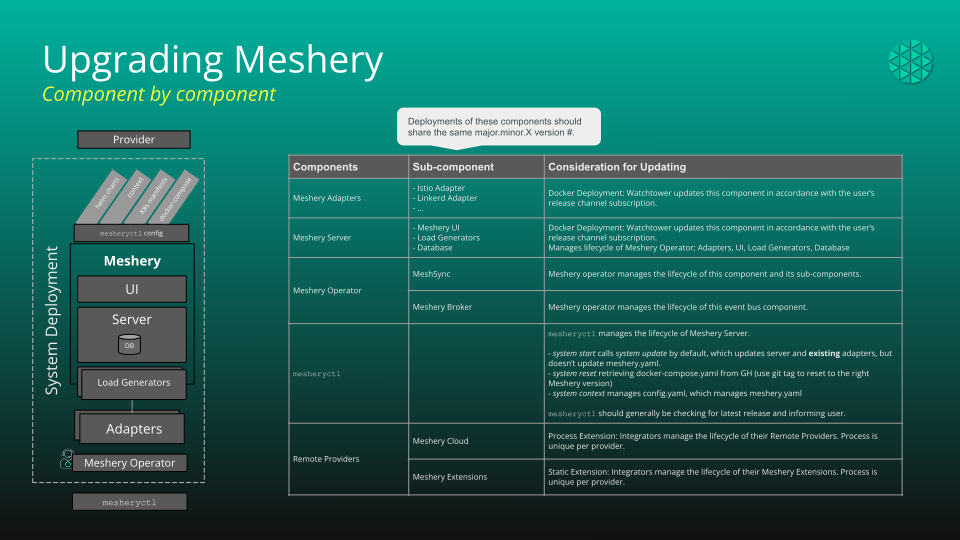
Figure: Meshery components
Some of the components must be upgraded simultaneously, while others may be upgraded independently. The following table depicts components, their versions, and deployment units (deployment groups).
Versioning of Meshery Components
| Components | Sub-component | Considering or Updating |
|---|---|---|
| Meshery Adapters | Any and All Adapters | Docker Deployment: Watchtower updates this component in accordance with the user’s release channel subscription. |
| Meshery Server | Meshery UI | Manages lifecycle of Meshery Operator; Adapters, UI, Load Generators, Database. Docker Deployment: Watchtower updates this component in accordance with the user’s release channel subscription. |
| Load Generators | ||
| Database | ||
| Meshery Operator | MeshSync | Meshery Operator manages the lifecycle of this component and its sub-components. |
| Meshery Broker | Meshery Operator manages the lifecycle of this event bus component. | |
| `mesheryctl` | mesheryctl manages the lifecycle of Meshery Server.
| |
| Remote Providers | Meshery Cloud | Process Extension: Integrators manage the lifecycle of their Remote Providers. The process is unique per provider. |
| Meshery Extensions | Static Extension: Integrators manage the lifecycle of their Meshery Extensions. The process is unique per provider. |
Sub-components deploy as a unit; however, they do not share the same version number.
Meshery Docker Deployments
Pull the latest images for Meshery Server, Adapters, and UI according to your release channel, then apply them to the running deployment:
mesheryctl system update    # pull latest images per your release channel
mesheryctl system restart   # apply them to the running deployment
Meshery Kubernetes Deployments
Upgrade with Helm. Pin an explicit chart version rather than tracking latest, and use the upgrade-friendly probe values so Server pods are not killed while reloading capabilities:
helm repo update meshery
helm upgrade meshery meshery/meshery --namespace meshery \
  --version <target-version> \
  -f values-upgrade.yaml \
  --wait --timeout 10m
Keep your copy of
values-upgrade.yaml
version-controlled alongside your own values.
Managed-cluster components upgrade themselves
No action is required on managed clusters. When the upgraded Meshery Server
(re)connects to a managed cluster, it re-applies the meshery-operator Helm
chart, which refreshes the Broker and MeshSync CRD schemas and rolls the
Operator, which then reconciles MeshSync and Broker. The next section explains
how the chart version is chosen.
A manual helm upgrade of meshery-operator (or a hand-edited image tag) on
a cluster that Meshery Server manages is a stopgap at best: the Server’s
reconciliation re-applies the chart version it resolves and will revert your
change. The durable way to get a newer Operator is to upgrade Meshery Server;
to hold one connection at a specific chart version, set operator.version on
that connection - see
Choosing the chart version yourself.
How Meshery Server manages Meshery Operator
Meshery Server owns the lifecycle of Meshery Operator on every managed cluster. Understanding this relationship explains what upgrades automatically and what you should - and should not - touch by hand.
Installation. When Meshery Server connects to a Kubernetes cluster (in
operator deployment mode), it installs the meshery-operator Helm chart from
meshery.io/charts into the meshery namespace.
The chart version it asks for matches the Meshery Server release version -
each Server release snapshots the operator chart (and the operator version
pinned inside it) as of that release.
What actually gets deployed is always a published chart. The Server reads the repository’s index before installing and never hands Helm a version the repository does not carry, so two everyday cases are corrected rather than failed:
- Not published yet. Chart publishing trails Server releases, so a current Server routinely names a chart that does not exist yet. The newest published release is deployed instead.
- Too old to run. A Server old enough to name a chart below
v1.0.51, the oldest chart verified to deploy successfully, gets the oldest published chart at or above that boundary. Every chart checked below it leaves the Operator Pod unable to become ready; the symptoms and the reasoning are in Meshery Operator will not start.
Neither substitution is silent: it is reported in the events feed, naming the version that was deployed and why. Release candidates are never chosen for you. If the chart repository cannot be reached at all, installation is withheld with a visible error rather than attempted at an unverified version, while an already-installed Operator keeps reporting its status and version as usual.
To choose the chart version yourself instead of tracking the Server release,
set operator.version on the connection. A version you set is deployed exactly
as written, or refused with a visible error if it names a version the repository
does not publish or a moving tag such as stable-latest - it is never
substituted, and the minimum above does not apply to it, so a pin below
v1.0.51 is installed as asked. See
Choosing the chart version yourself.
Upgrades. Upgrading Meshery Server is what upgrades the Operator: on
(re)connection, the Server re-applies the operator chart at its own (new)
version. That helm upgrade triggers the chart’s CRD update Job - a
pre-upgrade hook that server-side-applies the current Broker and MeshSync
CRD schemas (Helm alone never updates CRDs on upgrade) - and rolls the
Operator Deployment to the operator image pinned in the chart. The Operator
then reconciles MeshSync and the Broker.
Reconciliation. The Server periodically re-applies the operator chart if the Operator is missing or unhealthy. Two practical consequences:
- Manual operator changes are temporary. A hand-run
helm upgrade meshery-operator --version <x>or an edited image tag on a Server-managed cluster will be reverted to the chart version the Server resolves (above) by the next reconciliation.operator.versionon the connection is the durable way to choose a version on a managed cluster; standalone/manual operator installs are only durable on clusters that Meshery Server does not manage. - Operator versions are pinned, not floating. The operator image is a
fixed version per chart release (no
stable-latestdrift): an Operator pod restart never silently changes the operator version. Upgrades happen only when the chart content changes - that is, when you upgrade Meshery Server.
CRDs persist. The brokers.meshery.io and meshsyncs.meshery.io CRDs
(and your Broker/MeshSync objects) deliberately survive operator
uninstalls and Helm release deletion. Removing them - and with them every
custom resource of those types - is an explicit, manual step:
kubectl delete crd brokers.meshery.io meshsyncs.meshery.io.
You can toggle operator deployment per cluster in Meshery UI under Settings, or avoid deploying the operator entirely by choosing MeshSync’s embedded mode for the connection. See Meshery Operator for the architecture.
If the Operator does not come back after an upgrade, its status card carries the reason - a chart version that could not be resolved surfaces there and in the connection’s Diagnostics rather than disappearing. A failure caused by a transient chart-repository outage clears on its own: redeploy the Operator from the connection’s actions and the Server re-resolves the version.
Verifying the upgrade
# Server and components
mesheryctl system status

# The Meshery Operator image actually running in the cluster
kubectl -n meshery get deploy meshery-operator \
  -o jsonpath='{.spec.template.spec.containers[0].image}{"\n"}'

# The chart release that installed it (chart version and app version)
helm -n meshery list --filter meshery-operator

# CRDs are current (v1alpha2 storage) and healthy
kubectl get crds brokers.meshery.io meshsyncs.meshery.io

# Broker and MeshSync are reconciled and ready
kubectl -n meshery get brokers,meshsyncs
kubectl -n meshery get statefulset/meshery-nats deployment/meshery-meshsync
In Meshery UI, confirm the cluster connection shows the Operator, MeshSync, and Broker as connected under Settings → Environment.
Rolling back
helm rollback meshery --namespace meshery # Kubernetes deployments
Rolling back the Server is low-risk for data: durable state lives with your Remote Provider, and the local database is a rebuildable cache. Two notes:
- The Operator follows the Server: after a rollback, the Server re-applies the
operator chart it resolves for the rolled-back release. Rolling back far
enough that the Server would name a chart older than the minimum deployable
version normally still lands a working Operator - the Server raises that
derived request to the oldest published chart at or above the minimum and
says so in the events feed. An explicit
operator.versionon a connection is never raised, so a pin below the minimum survives the rollback unchanged. - CRD schemas are not rolled back by
helm rollbackdirectly. When the rolled-back Server reconnects to managed clusters, it re-applies the older operator chart as a Helm upgrade, and that chart’s CRD update Job re-applies the older schemas. Stored objects remain readable throughout, because served versions stay identical across current schema revisions.