# Shortcode Formatting Examples

> A visual reference guide for shortcodes available in the Meshery documentation theme.

---

LLMS index: [llms.txt](/llms.txt)

---

The Meshery documentation uses a variety of shortcodes to create rich, formatted content such as callouts, tabs, and generated tables.

This page is a visual reference for documentation contributors. It shows the markdown syntax required to invoke each shortcode, followed by its rendered output, so you can see exactly how a shortcode behaves before using it.

Shortcodes come from two places:

- [`docs/layouts/shortcodes/`](https://github.com/meshery/meshery/tree/master/docs/layouts/shortcodes) — defined in this repository and documented in full below.
- The [Docsy theme](https://www.docsy.dev/docs/adding-content/shortcodes/) — inherited, and summarized under [Inherited Shortcodes](#inherited-shortcodes).

The Meshery documentation also imports `github.com/layer5io/docs` as a Hugo module, but that import is mounted to a single partial in `hugo.toml` and contributes no shortcodes.

---

## Shortcode Delimiters

Hugo shortcodes are invoked with one of two delimiter pairs, and the choice changes how the shortcode's body is treated:

| Delimiter | Body treatment |
|---|---|
| `{{< name >}}` | The body is passed to the shortcode as raw text. |
| `{{% name %}}` | The body is rendered as Markdown before the shortcode receives it. |

Shortcodes defined in this repository that take a body render it themselves via `.Page.RenderString`, and therefore expect the `{{< >}}` form. The inherited Docsy callouts expect `{{% %}}`. Each entry states which form to use.

The form a shortcode expects is determined by its implementation, not by convention. When an entry here disagrees with what you see on the site, the file in `docs/layouts/shortcodes/` is the source of truth, and the entry needs fixing.

---

## Meshery Shortcodes

Listed alphabetically.

### code

Wraps a snippet in a styled code block with a copy-to-clipboard button, without needing a manually assigned ID per snippet.

**Use when** the reader is expected to copy and run the snippet. For code that is only being read — illustrative output, config fragments under discussion — a standard fenced block is lighter and easier to maintain.

| Parameter | Required | Default | Description |
|---|---|---|---|
| `code` | Yes | — | The snippet to render. HTML-escaped on output. Multi-line values are supported; wrap the value in backticks rather than quotes when the snippet itself contains quotes. |

Takes no body. Use the `{{< >}}` form.

#### Syntax

```markdown
{{< code code="make site" >}}
```

#### Rendered output


<pre class="codeblock-pre">
	<div class="codeblock">
		<code class="clipboardjs">make site</code>
	</div>
</pre>


<div class="alert alert-warning" role="alert"><div class="h4 alert-heading" role="heading">Note</div>


Don't use the `code` shortcode when the snippet appears between items of an ordered list — it breaks the numbering, and the item following the snippet restarts at 1.
</div>


### discuss

Renders a static callout linking to the Meshery Discussion Forum.

**Use when** closing a page where readers are likely to have follow-up questions. The text is fixed, so one per page at most.

Takes no parameters and no body.

#### Syntax

```markdown
{{< discuss >}}
```

#### Rendered output

<div class="alert alert-dark" role="alert">
  <h4 class="alert-heading">Discussion Forum</h4>
  <p>Don't find an answer to your question here? Ask on the <a href="https://discuss.meshery.io/">Discussion Forum</a>.</p>
</div>


### extension-guide

Renders a responsive card grid from a data file in `docs/data/`. Each card shows an image, a title, and a description.

**Use when** presenting a set of parallel options the reader chooses between — component types, extension points — where a visual grid aids scanning. For a linear list of links, use `section-pages`.

| Parameter | Required | Default | Description |
|---|---|---|---|
| `data_file` | Yes | — | Base name of the file in `docs/data/` supplying the card entries, without extension. |
| `guide_title` | Yes | — | Key in each data entry whose value is used as the card title, and as the image `alt` text. |
| `guide_description` | Yes | — | Key in each data entry whose value is used as the card description. Entries missing this key render a card with no description. |
| `guide_svg` | Yes | — | Key in each data entry whose value is the image filename. Entries missing this key render a card with no image. |
| `guide_assets_folder` | Yes | — | Folder name under `images/`. Lowercased before use, producing `images/<folder>/<filename>`. Preferred when both parameters are provided; `guide_assests_folder` is retained for backward compatibility. |

Takes no body. Use the `{{< >}}` form.

#### Syntax

```markdown
{{< extension-guide
  data_file="edges"
  guide_title="Edge"
  guide_description="Description"
  guide_svg="SVG"
  guide_assets_folder="shapes"
>}}
```

#### Rendered output

<style>

    .extension-guides-container {
      display: flex;
      flex-wrap: wrap;
      gap: 20px;
      justify-content: space-between;
      margin-top: 2rem;

    }
    .extension-guide-card {
       display: flex;
     flex-direction: column;
       max-width: 20rem;
       max-height: 30rem;
       gap: 1rem;
  }
    .extension-guide-svg-container {
       height: auto;
       display: flex;
       flex-direction: column;
       align-items: center;
       gap: 0.455rem;
     flex-basis: 30%;
  }
    .extension-guide-svg-container img {
     width: 50%;
     height: auto;
  }
    .extension-guide-details {
       display: flex;
       flex-direction: column;
       flex-basis: 77%;
       gap: 10px;
     text-align: center;
  }
    @media (max-width: 767px) {
      .extension-guides-container {
        flex-direction: column;
      }
      .extension-guide-svg-container {
        gap: 0.3rem;
      }
      .extension-guide-svg-container img {
        width: 40%;
      }
      .extension-guide-card {
        max-width: 30rem;
        flex-direction: column;
      }
     }
  </style>


<div class="extension-guides-container">


    <div class="extension-guide-card">
      <div class="extension-guide-svg-container">
        
          <img src="/images/shapes/ArrowHead.svg" alt="Arrow Head">
        
        <div style="text-align:center;">Arrow Head</div>
      </div>
      <div class="extension-guide-details">
        
          <div>Represents general direction or flow in diagrams. In UML, it could indicate direction in an association or dependency.</div>
        
      </div>
    </div>
  
    <div class="extension-guide-card">
      <div class="extension-guide-svg-container">
        
          <img src="/images/shapes/BezierCurveLine.svg" alt="Bezier Curve Line">
        
        <div style="text-align:center;">Bezier Curve Line</div>
      </div>
      <div class="extension-guide-details">
        
          <div>Used for curved relationships, which might indicate non-linear or non-direct connections. In UML, it could be used for inheritance or flow that isn&#39;t straightforward.</div>
        
      </div>
    </div>
  
    <div class="extension-guide-card">
      <div class="extension-guide-svg-container">
        
          <img src="/images/shapes/FilledCircleHead.svg" alt="Filled Circle Head">
        
        <div style="text-align:center;">Filled Circle Head</div>
      </div>
      <div class="extension-guide-details">
        
          <div>Used for aggregation in UML, where one class contains another but does not own it (e.g., a library containing books).</div>
        
      </div>
    </div>
  
    <div class="extension-guide-card">
      <div class="extension-guide-svg-container">
        
          <img src="/images/shapes/FilledDiamondHead.svg" alt="Filled Diamond Head">
        
        <div style="text-align:center;">Filled Diamond Head</div>
      </div>
      <div class="extension-guide-details">
        
          <div>Used for aggregation in UML, typically an empty diamond at the container end, indicating a &#34;whole-part&#34; relationship.</div>
        
      </div>
    </div>
  
    <div class="extension-guide-card">
      <div class="extension-guide-svg-container">
        
          <img src="/images/shapes/FilledSquareHead.svg" alt="Filled Square Head">
        
        <div style="text-align:center;">Filled Square Head</div>
      </div>
      <div class="extension-guide-details">
        
          <div>Represents composition in UML, a stronger relationship than aggregation, where the contained class cannot exist without the container (e.g., a house and its rooms).</div>
        
      </div>
    </div>
  
    <div class="extension-guide-card">
      <div class="extension-guide-svg-container">
        
          <img src="/images/shapes/FilledTriangleHead.svg" alt="Filled Triangle Head">
        
        <div style="text-align:center;">Filled Triangle Head</div>
      </div>
      <div class="extension-guide-details">
        
          <div>Often used for inheritance in UML, where one class is a subclass of another. It indicates the &#34;is-a&#34; relationship.</div>
        
      </div>
    </div>
  
    <div class="extension-guide-card">
      <div class="extension-guide-svg-container">
        
          <img src="/images/shapes/LineWithCircles.svg" alt="Line With Circles">
        
        <div style="text-align:center;">Line With Circles</div>
      </div>
      <div class="extension-guide-details">
        
          <div>Often represents a weak or indirect association in UML. It can also be used for dependencies or indicating optional relationships.</div>
        
      </div>
    </div>
  
    <div class="extension-guide-card">
      <div class="extension-guide-svg-container">
        
          <img src="/images/shapes/SmoothLineWithCircle.svg" alt="Smooth Line With Circle">
        
        <div style="text-align:center;">Smooth Line With Circle</div>
      </div>
      <div class="extension-guide-details">
        
          <div>Represents a smooth transition or flow between elements. It could be used in scenarios where gradual change or influence is depicted.</div>
        
      </div>
    </div>
  
    <div class="extension-guide-card">
      <div class="extension-guide-svg-container">
        
          <img src="/images/shapes/StraightLine.svg" alt="Straight Line">
        
        <div style="text-align:center;">Straight Line</div>
      </div>
      <div class="extension-guide-details">
        
          <div>Represents a simple association or direct relationship between two entities or classes in UML.</div>
        
      </div>
    </div>
  
    <div class="extension-guide-card">
      <div class="extension-guide-svg-container">
        
          <img src="/images/shapes/TreeLine.svg" alt="Tree Line">
        
        <div style="text-align:center;">Tree Line</div>
      </div>
      <div class="extension-guide-details">
        
          <div>Represents hierarchical relationships, such as a parent class with child classes, or a main system branching into subsystems.</div>
        
      </div>
    </div>
  
    <div class="extension-guide-card">
      <div class="extension-guide-svg-container">
        
          <img src="/images/shapes/WaveLine.svg" alt="Wave Line">
        
        <div style="text-align:center;">Wave Line</div>
      </div>
      <div class="extension-guide-details">
        
          <div>Typically used to represent asynchronous signals or connections that aren&#39;t continuous. It may also denote complex relationships or uncertain flows in certain custom diagrams.</div>
        
      </div>
    </div>
  
    <div class="extension-guide-card">
      <div class="extension-guide-svg-container">
        
          <img src="/images/shapes/ZigzagLine.svg" alt="Zigzag Line">
        
        <div style="text-align:center;">Zigzag Line</div>
      </div>
      <div class="extension-guide-details">
        
          <div>This is often used to represent signals with interference or noise. In system design, it can be used to indicate a disrupted or unreliable connection.</div>
        
      </div>
    </div>
  
</div>


### latest-release

Prints the tag of the most recent non-prerelease entry under the `releases` content type.

**Use when** a page needs to show the current release and would otherwise go stale. Note that it emits an `<h2>`, so the release tag appears in the page's table of contents.

Takes no parameters and no body.

#### Syntax

```markdown
{{< latest-release >}}
```

#### Rendered output


<h2>v1.0.74</h2>


### model-categories

Renders one `<li>` per model category, each with a parenthetical count of the models in that category, ordered by count descending.

**Use when** listing categories inside an existing list. This shortcode emits list items only — **you must supply the surrounding `<ul>` or `<ol>` yourself**, or the items will render unwrapped.

Counts are derived from the `integrations-category` param on each model page, so they stay accurate as models are added or recategorized. Category names are plain labels rather than links, because the models index is a single alphabetized page with no per-category filtering.

Takes no parameters and no body.

#### Syntax

```markdown
<ul>
  {{< model-categories >}}
</ul>
```

#### Rendered output

<ul>
  <li>App Definition and Development (84)</li><li>Provisioning (69)</li><li>Observability and Analysis (56)</li><li>Cloud Native Network (43)</li><li>Orchestration &amp; Management (35)</li><li>Security &amp; Compliance (30)</li><li>Database (19)</li><li>Runtime (18)</li><li>Cloud Native Storage (10)</li><li>Tools (8)</li><li>Serverless (7)</li><li>Machine Learning (6)</li><li>Platform (6)</li><li>Analytics (2)</li>
</ul>

### model-count

Prints the current total number of Meshery models, counted from the pages under `extensions/models/`.

**Use when** a sentence quotes the model total and would otherwise need manual updating as models are added.

Takes no parameters and no body. Emits a bare number, so it composes inline.

#### Syntax

```markdown
Meshery currently supports {{< model-count >}} models.
```

#### Rendered output

Meshery currently supports 393 models.

### related-discussions

Lists up to eight forum topics matching a tag, plus a link to view all discussions with that tag.

**Use when** an active forum tag maps closely to the page topic. Topics are read from `site.Data.discuss.<tag>`, not fetched at request time — if no data file exists for the tag, only the "view all" link renders, with no error. Output changes as that data is refreshed, so don't write prose that depends on which topics appear.

| Parameter | Required | Default | Description |
|---|---|---|---|
| `tag` | No | `meshery` | Forum tag to match. Must correspond to a key under `site.Data.discuss`. |

Takes no body. Use the `{{< >}}` form.

#### Syntax

```markdown
{{< related-discussions tag="meshery" >}}
```

#### Rendered output

<div class="related-discussions">
  <h3>Recent Discussions with "meshery" Tag</h3><ul><li>
          <a href="https://discuss.meshery.io/t/bug-new-catalog-publish-request-email-renders-with-oversized-social-icons-and-squashed-content-on-mobile/8138" target="_blank" rel="noopener noreferrer">
            [Bug] &#34;New Catalog publish request&#34; email renders with oversized social icons and squashed content on mobile
          </a>
        </li><li>
          <a href="https://discuss.meshery.io/t/how-to-present-an-issue-pr-in-a-development-meeting-feedback-wanted/8107" target="_blank" rel="noopener noreferrer">
            How to Present an Issue/PR in a Development Meeting: feedback wanted
          </a>
        </li><li>
          <a href="https://discuss.meshery.io/t/newbie-here-excited-to-join/8052" target="_blank" rel="noopener noreferrer">
            Newbie here -- Excited to join
          </a>
        </li><li>
          <a href="https://discuss.meshery.io/t/play-meshery-io-is-down/8045" target="_blank" rel="noopener noreferrer">
            play.meshery.io is DOWN
          </a>
        </li><li>
          <a href="https://discuss.meshery.io/t/your-path-to-becoming-a-certified-meshery-contributor-starts-here/7652" target="_blank" rel="noopener noreferrer">
            Your Path to Becoming a Certified Meshery Contributor Starts Here
          </a>
        </li><li>
          <a href="https://discuss.meshery.io/t/design-meshery-mcp-server-architecture-and-registration-interface/7954" target="_blank" rel="noopener noreferrer">
            Design: Meshery MCP Server architecture and registration interface
          </a>
        </li><li>
          <a href="https://discuss.meshery.io/t/the-meshery-mcp-server-foundation-is-up-lets-agree-on-what-to-build-next/7952" target="_blank" rel="noopener noreferrer">
            The Meshery MCP Server foundation is up, let&#39;s agree on what to build next
          </a>
        </li><li>
          <a href="https://discuss.meshery.io/t/new-intro-topic/7975" target="_blank" rel="noopener noreferrer">
            New intro topic
          </a>
        </li></ul><p>
    <a href="https://discuss.meshery.io/tag/meshery" target="_blank" rel="noopener noreferrer">
      View all discussions tagged with <code>meshery</code>
    </a>
  </p>
</div>


### relationships

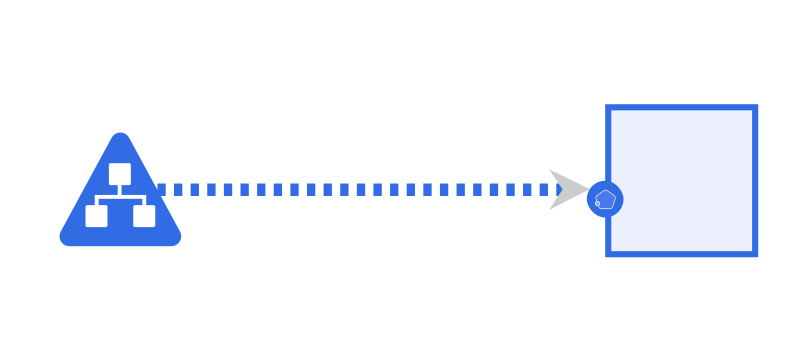
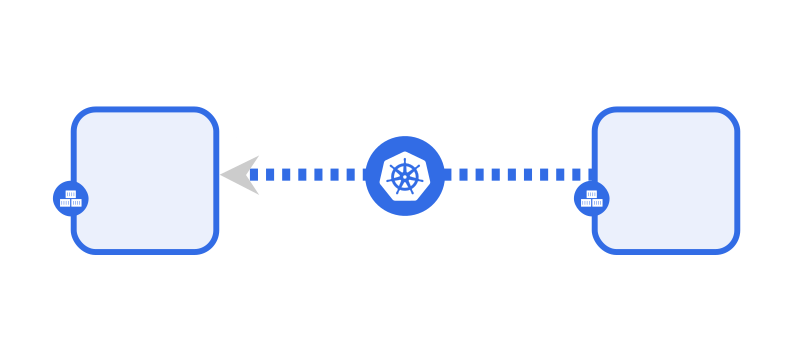
Inserts a predefined, collapsible set of visual examples of component relationships, grouped by kind and subtype, each linking to the design in the playground.

**Use when** explaining how components relate structurally. The content is fixed — it takes no parameters and cannot be scoped to a subset of relationship kinds.

Takes no parameters and no body.

#### Syntax

```markdown
{{< relationships >}}
```

#### Rendered output

<style>
    figcaption {
        margin: 1rem auto;
    }
</style>
<details open>
    <summary>Example Visual Representations</summary>
    <details><summary>Kind: Hierarchical</summary>
        <figure>
            <figcaption>subType: Parent | Namespace (Parent) and ConfigMap (child), Role (Child)<a target="_blank" href="https://playground.meshery.io/extension/meshmap?mode=design&design=6370ffcd-13a6-4a65-b426-30f1e63dc381"> (open in playground)</a></figcaption>
        </figure>
        <img alt="Hierarchical - Parent: Namespace to other components" src="/concepts/logical/relationships/images/hierarchical_parent_relationship.svg"/>
        <br>
        <figure>
            <figcaption>subType: Inventory | Namespace and ConfigMap<a target="_blank" href="https://playground.meshery.io/extension/meshmap?design=21d40e36-8ab7-4f9f-9fed-f6a818510446"> (open in playground)</a></figcaption>
        </figure>
        <img alt="Hierarchical - Parent: Namespace to other components" src="/concepts/logical/relationships/images/hierarchical_inventory_relationship.svg"/>
    </details>
    <details><summary>Kind: Edge</summary>
        <figure>
            <figcaption>Type: `Non-Binding`, subType: `Permission`: Cluster Role with Cluster Role Binding to Service Account<a target="_blank" href="https://playground.meshery.io/extension/meshmap?mode=design&design=7dd39d30-7b14-4f9f-a66c-06ba3e5000fa"> (open in playground)</a></figcaption>
        </figure>
        <img alt="Binding" src="/concepts/logical/relationships/images/edge_permission_relationship_cluster_role_service_account.svg"/>
        <figure>
            <figcaption>Type: `Binding`, subType: `Mount`: Pod to Persistent volume via Persistent volume claim<a target="_blank" href="https://playground.meshery.io/extension/meshmap?mode=design&design=43d5fdfe-25f8-4c2c-be9d-30861bbc2a08"> (open in playground)</a> </figcaption>
        </figure>
        <img alt="Edge - Mount" src="/concepts/logical/relationships/images/edge_mount_relationship_pod_persistent_volume.svg"/>
        <br>
        <figure>
            <figcaption>Type: `Non-Binding`, subType: `Network`: Ingress to Service<a target="_blank" href="https://playground.meshery.io/extension/meshmap?mode=design&design=1f79b0c6-2efe-4ee9-b08c-e1bd07a3926b"> (open in playground)</a></figcaption>
        </figure>
        <img alt="Edge - Network" src="/concepts/logical/relationships/images/edge_network_ingress_to_service_relationship.svg"/>
        <br>
        <figure>
            <figcaption>Type: `Non-Binding`, subType: `Network`: Service to Pod<a target="_blank" href="https://playground.meshery.io/extension/meshmap?mode=design&design=90a9b4a0-a296-44b5-b1c5-7b1cb4827a77"> (open in playground)</a></figcaption>
        </figure>
        <img alt="Edge - Network: Ingress to Service" src="/concepts/logical/relationships/images/edge_network_service_to_pod_relationship.svg"/>
        <br>
        <figure>
            <figcaption>Type: `Non-Binding`, subType: `Network`: Service to Service<a target="_blank" href="https://playground.meshery.io/extension/meshmap?mode=design&design=4e368e07-5039-400e-b637-96b0241af799"> (open in playground)</a></figcaption>
        </figure>
        <img alt="Edge - Network" src="/concepts/logical/relationships/images/edge_network_service_to_service_relationship.svg"/>
        <br>
        <figure>
            <figcaption>Type: `Non-Binding`, subType: `Network`: Service to Endpoint<a target="_blank" href="https://playground.meshery.io/extension/meshmap?mode=design&design=ab35416d-7cf7-4540-8b2e-7271ffeadde2"> (open in playground)</a></figcaption>
        </figure>
        <img alt="Edge - Network" src="/concepts/logical/relationships/images/edge_network_service_to_endpoints_relationship.svg"/>
        <br>
        <figure>
            <figcaption>Type: `Non-Binding`, subType: `Network`: Service to Deployment<a target="_blank" href="https://playground.meshery.io/extension/meshmap?mode=design&design=33742281-428d-4340-b42e-6a0fd4ba1d0a"> (open in playground)</a></figcaption>
        </figure>
        <img alt="Edge - Network" src="/concepts/logical/relationships/images/network_edge_relationship_service_deployment.svg"/>
        <br>
        <figure>
            <figcaption><code>type:non-binding</code>, subType: `Network`: Network Policy (Pod to Pod) <a target="_blank" href="https://playground.meshery.io/extension/meshmap?mode=design&design=58fda714-eaa4-490f-b228-b8bcfe3a1e47s"> (open in playground)</a></figcaption>
        </figure>
        <img alt="Edge - Network Policy" src="/concepts/logical/relationships/images/edge_firewall_relationship_pod_to_pod.svg" />
    </details>
</details>


### section-pages

Renders one `<li>` per immediate child page of a section, each linking to the page and appending its `description` from front matter when set.

**Use when** a landing page should index its children and stay correct as pages are added or removed. This shortcode emits list items only — **you must supply the surrounding `<ul>` or `<ol>` yourself**.

| Parameter | Required | Default | Description |
|---|---|---|---|
| `section` | No | The page's own Hugo section (`.Page.Section`) | Section whose children are listed. For nested paths the default is rarely what you want — set it explicitly. |
| `exclude` | No | None | Comma-separated final path segments to leave out, for example `exclude="extensibility"` to list the pages directly under `reference` without its Extensibility subsection. |

Pages are sorted by title. A page is excluded when its front matter sets `hide_homepage`, and the section's own landing page is always excluded. The final path segments `quick-start` and `faq` are always excluded, along with any segments named in `exclude`. When nothing matches, a single italic "No pages found in this section." item renders in place of the list.

Takes no body. Use the `{{< >}}` form.

#### Syntax

```markdown
<ul>
  {{< section-pages section="concepts/architecture" >}}
</ul>
```

#### Rendered output

<ul>
  <li>
    <a href="/concepts/architecture/adapters/">Adapters</a><span> - Adapters extend Meshery&#39;s management capabilities in any number of ways, including lifecycle, configuration, performance, governance, identity...</span></li><li>
    <a href="/concepts/architecture/broker/">Broker</a><span> - Meshery broker component facilitates data streaming between kubernetes cluster components and outside world.</span></li><li>
    <a href="/concepts/architecture/catalog/">Catalog</a><span> - Browsing and using cloud native patterns</span></li><li>
    <a href="/concepts/architecture/database/">Database</a><span> - Meshery offers support for internal caching with the help of file databases. This has been implemented with several libraries that supports different kinds of data formats.</span></li><li>
    <a href="/concepts/architecture/deployment-engine/">Deployment Engine</a><span> - How Meshery fulfills a design - resolving the registrant behind each component and routing that component either to Meshery Server itself or to a Meshery Adapter.</span></li><li>
    <a href="/concepts/architecture/meshsync/">MeshSync</a><span> - MeshSync ensures Meshery Server is continuously in-sync with the state of infrastructure under management.</span></li><li>
    <a href="/concepts/architecture/operator/">Operator</a><span> - Meshery Operator controls and manages the lifecycle of components deployed inside a kubernetes cluster</span></li>
</ul>

### static

Resolves a path into a site-relative URL.

**Use when** referencing an asset from a page that may be moved, or where `baseURL` differs between local and production builds. Most commonly nested inside an `<img>` tag or a Markdown image link.

| Parameter | Required | Default | Description |
|---|---|---|---|
| _positional_ | Yes | — | Path relative to the site root, passed as the first unnamed argument. Emitted as a bare URL with no surrounding markup. |

Takes no body. Use the `{{< >}}` form.

#### Syntax

```markdown
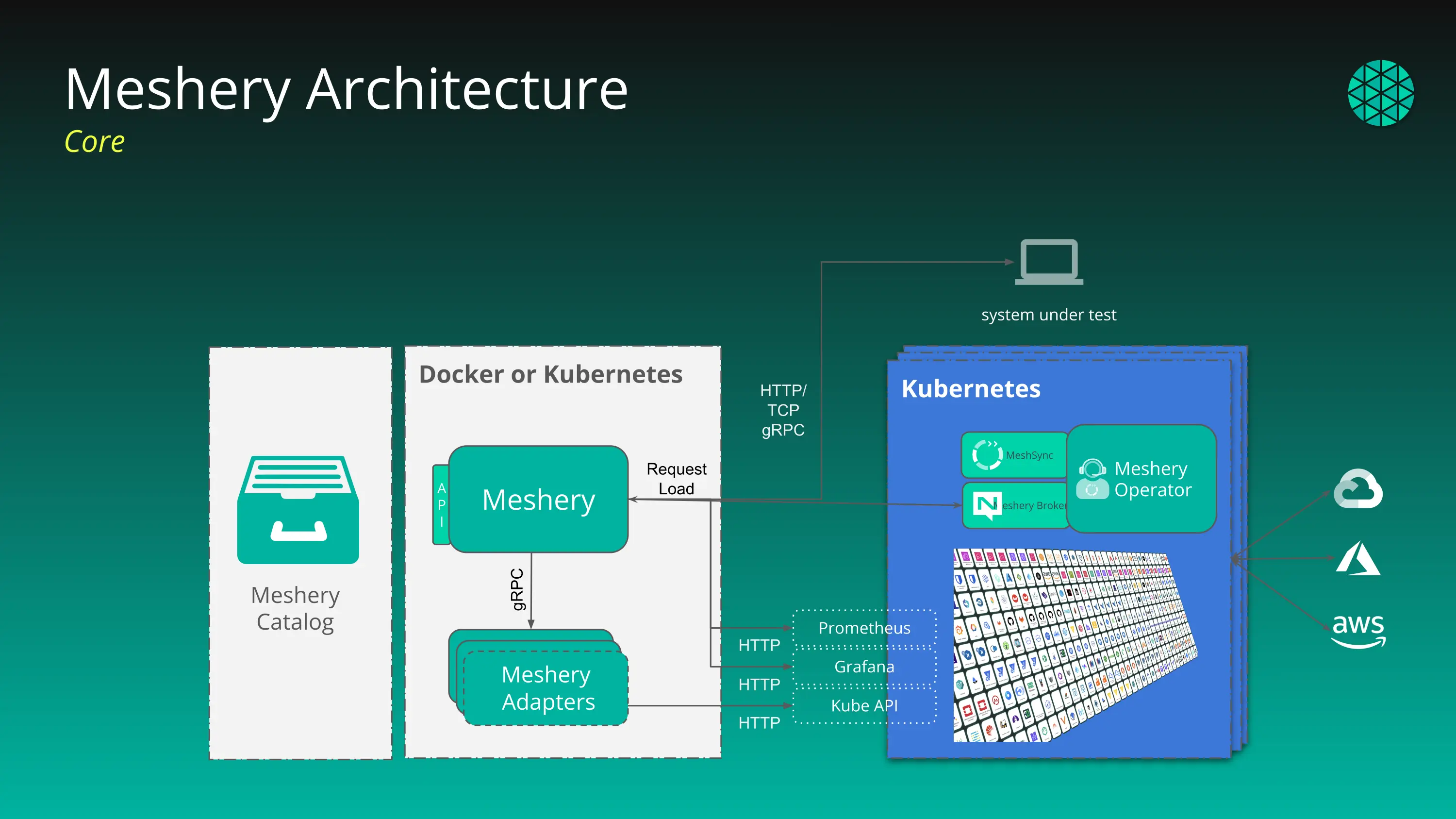
![Meshery Architecture]({{< static "images/meshery-architecture.webp" >}})
```

#### Rendered output

![Meshery Architecture](/images/meshery-architecture.webp)

### tabs

Organizes content into selectable tabs.

**Use when** presenting the same task across mutually exclusive contexts — operating systems, installation methods — where the reader needs exactly one branch. Don't use it for sequential content; readers miss what's behind an unselected tab.

| Parameter | Required | Default | Description |
|---|---|---|---|
| `id` | Yes | — | Identifier for the tab group. Omitting it raises a build error naming the file and position. Each invocation is additionally given an instance number, so repeating an `id` on one page does not cause tab groups to interfere. |
| `level` | No | `1` | Nesting level. Values above `1` add a nested-container class, for tabs inside tabs. |

Takes a body. Use the `{{< >}}` form. Within the body:

- Separate tabs with an `<!-- tab -->` HTML comment.
- The **first line of each block is the tab label**; the content begins after the first blank line.
- A label may carry an icon by appending `| ` and an icon value. A value starting with `fa` is treated as a Font Awesome class; anything else is inserted as raw markup.
- The first non-empty block is selected by default.

#### Syntax

```markdown
{{< tabs id="example-tab-group" >}}
Tab 1 Title

This is the content for the first tab.
<!-- tab -->
Tab 2 Title | fas fa-cog

This is the content for the second tab.
{{< /tabs >}}
```

#### Rendered output

<div class="tab-container tab-level-1"><input id="example-tab-group-4-1" type="radio" name="example-tab-group-4" checked>
    <label for="example-tab-group-4-1">Tab 1 Title
    </label>
    <section class="tabbed" id="example-tab-group-4-content-1">This is the content for the first tab.</section><input id="example-tab-group-4-2" type="radio" name="example-tab-group-4">
    <label for="example-tab-group-4-2"><i class="fas fa-cog" aria-hidden="true"></i>Tab 2 Title
    </label>
    <section class="tabbed" id="example-tab-group-4-content-2">This is the content for the second tab.</section></div>

### Snippet shortcodes

Some shortcodes are Markdown files in subdirectories of `docs/layouts/shortcodes/` rather than templates, and are invoked by path. They take no parameters and no body, and exist to keep a reusable block of prose in one place:

| Shortcode | Content |
|---|---|
| `{{< mesheryctl/installation-bash >}}` | `mesheryctl` installation via bash |
| `{{< mesheryctl/installation-brew >}}` | `mesheryctl` installation via Homebrew |
| `{{< mesheryctl/installation-scoop >}}` | `mesheryctl` installation via Scoop |
| `{{< mesheryctl/system-dashboard >}}` | `mesheryctl system dashboard` usage |
| `{{< compatibility/adapter-status >}}` | Adapter status block |
| `{{< compatibility/compatibilityMatrix >}}` | Compatibility matrix prose |
| `{{< compatibility/rancher >}}` | Rancher-specific notes |

To add one, drop a `.md` file into the relevant subdirectory — no template is required.

---

## Data-Driven Shortcodes

The shortcodes below each render a full, live dataset — error codes, vulnerabilities, `mesheryctl` commands, permissions, and so on — pulled from `docs/data/` or the site's own content. Because their real output can run to hundreds of rows and changes as that underlying data changes, this section shows the invocation syntax and links to the page where each one is used, rather than re-rendering the full table here.

All of them take no body, and all take no parameters except `mesheryctl-command-table`, which requires a `command` naming the command whose subcommands are tabulated.

| Shortcode | Syntax | See it rendered live |
|---|---|---|
| `adapters-table` | `{{< adapters-table >}}` | [Adapters](/concepts/architecture/adapters/) |
| `compatibility-matrix-kubernetes` | `{{< compatibility-matrix-kubernetes >}}` | [Compatibility Matrix](/project/compatibility-matrix/compatibility-matrix/) |
| `integration-tests` | `{{< integration-tests >}}` | [Compatibility Matrix](/project/compatibility-matrix/compatibility-matrix/) |
| `error-codes-index` | `{{< error-codes-index >}}` | [Error Codes Reference](/reference/error-codes/) |
| `error-codes-detail` | `{{< error-codes-detail >}}` | [Error Codes Reference](/reference/error-codes/) |
| `troubleshooting-guides-list` | `{{< troubleshooting-guides-list >}}` | [Error Codes Reference](/reference/error-codes/) |
| `mesheryctl-command-table` | `{{< mesheryctl-command-table command="adapter" >}}` | [mesheryctl Reference](/reference/mesheryctl/) |
| `mesheryctl-guides-list` | `{{< mesheryctl-guides-list >}}` | [mesheryctl Installation](/installation/mesheryctl/) |
| `network-ports` | `{{< network-ports >}}` | [Architecture](/concepts/architecture/) |
| `permissions` | `{{< permissions >}}` | [Permissions Reference](/reference/permissions/) |
| `tutorials-list` | `{{< tutorials-list >}}` | [Quick Start](/installation/quick-start/) |
| `vulnerabilities-table` | `{{< vulnerabilities-table >}}` | [Security Vulnerabilities](/project/security-vulnerabilities/) |

---

## Inherited Shortcodes

These come from the Docsy theme rather than this repository. They are listed here because they appear throughout the Meshery documentation and contributors will encounter them; the [Docsy shortcode reference](https://www.docsy.dev/docs/adding-content/shortcodes/) is authoritative for their full behavior.

### alert

Renders a coloured callout box with a heading.

**Use when** flagging a warning, prerequisite, or caveat that would interrupt the flow of the surrounding paragraph. For inline emphasis, use bold instead — a page dense with callouts trains readers to skip them.

| Parameter | Required | Default | Description |
|---|---|---|---|
| `color` | No | `primary` | Bootstrap contextual class: `primary`, `secondary`, `success`, `info`, `warning`, `danger`. |
| `title` | No | — | Bold heading above the body. |

Takes a body. Use the `{{% %}}` form, or the body's Markdown will render as literal asterisks and backticks.

#### Syntax

```markdown
{{% alert color="warning" title="Note" %}}
Run `make site` locally before opening your PR.
{{% /alert %}}
```

#### Rendered output

<div class="alert alert-warning" role="alert"><div class="h4 alert-heading" role="heading">Note</div>


Run `make site` locally before opening your PR.
</div>


### pageinfo

Renders a page-scoped information banner.

**Use when** the note applies to the whole page — deprecation, beta status, "applies to version X" — and belongs above the content. For a note scoped to one section, use `alert`.

| Parameter | Required | Default | Description |
|---|---|---|---|
| `color` | No | `primary` | Bootstrap contextual class, as for `alert`. |

Takes a body. Use the `{{% %}}` form.

#### Syntax

```markdown
{{% pageinfo color="info" %}}
This page describes a **beta** feature.
{{% /pageinfo %}}
```

#### Rendered output


<div class="pageinfo pageinfo-info">

This page describes a **beta** feature.

</div>


Docsy also provides `youtube`, `imgproc`, `blocks/*`, `cardpane`, and others. See the Docsy reference for those.

---

## Adding a New Shortcode

Shortcode implementations live in `docs/layouts/shortcodes/`. The filename becomes the shortcode name: `docs/layouts/shortcodes/model-count.html` is invoked as `{{< model-count >}}`, and a file in a subdirectory is invoked by path, as `{{< mesheryctl/installation-bash >}}`.

A template in this repository overrides a theme template of the same name, so adding `docs/layouts/shortcodes/alert.html` would replace Docsy's `alert` site-wide. Do that deliberately, if at all.

1. **Create the template.** Open with a comment block stating what the shortcode outputs, any assumptions it makes about page location or front matter, and a usage line.

2. **Guard your assumptions.** Shortcodes are invoked from pages you did not write. Check that the values you depend on exist before indexing into them.

3. **Choose a failure mode deliberately.** Use `errorf` when a missing argument means the author made a mistake that must be fixed, as `tabs` does when `id` is absent. Use `warnf`, or emit nothing, when the page still renders usefully without the output. Both take `.Position` so the message names the file and line.

4. **Control whitespace.** Use `{{- -}}` trim markers so the shortcode does not emit stray newlines into the surrounding Markdown, which can break list numbering and inline usage.

5. **Say what wrapping the caller must supply.** A shortcode that emits bare `<li>` elements, as `section-pages` and `model-categories` do, is unusable without that fact being written down.

6. **Document it here.** Add an entry to the catalog above with the parts every entry carries: a description, a "use when" line, a parameter table, and a syntax and rendered-output pair. A shortcode that isn't on this page is a shortcode contributors won't find.

**Example.** `model-count` derives its number from the site's own content rather than a hardcoded value, so the figure never goes stale:

```go-html-template
{{- $models := where site.RegularPages ".File.Dir" "like" `^extensions/models/` -}}
{{- len $models -}}
```

Note: When a shortcode can produce empty or zero output without failing, its entry above must say so, or contributors will read the result as a bug and file it as one.

<div class="alert alert-warning" role="alert"><div class="h4 alert-heading" role="heading">Register your shortcode</div>


If a new shortcode ships without an entry on this page, contributors have no way to discover it short of reading `docs/layouts/shortcodes/`, which is the problem this page exists to solve. Treat the catalog entry as part of the shortcode, not as follow-up work.
</div>