# Extensibility: Providers

> Meshery uses providers to enrich the level of depth by which it manages cloud native infrastructure.

---

LLMS index: [llms.txt](/llms.txt)

---

Meshery offers _Providers_ as a point of extensibility. It has a built-in Local Provider, named **"Local"** and supports _Remote Providers_ that are designed to be pluggable. _Remote Providers_ offer a point of extension to users / integrators to deliver enhanced functionality such as authentication and authorization, using Meshery as a platform.

<div class="alert alert-info" role="alert"><div class="h4 alert-heading" role="heading">Naming change</div>


The built-in local provider was previously named **"None"** and is now named **"Local"**. Meshery Server accepts `"None"` as a backward-compatible alias on cookies, the `PROVIDER` environment variable, and `~/.meshery/config.yaml`, so existing sessions and configurations continue to work without changes.
</div>


1. **Extensibility points offer clean separation of Meshery's core functionality versus plugin functionality.**
   - See a list of [Meshery's extensions](https://meshery.io/extensions).
1. **Remote Providers should be able to offer custom RBAC, custom UI components, and custom backend components**
   - Dynamically loadable frameworks need to be identified or created to serve each of these purposes.

### What functionality do Providers offer?

The functionalities offerred by a _Remote Provider_ may vary broadly between providers. Meshery offers extension points that Remote Providers are able to use to inject various functionalities, functionalities that are specific to that provider.
Some examples include:

- **Authentication and Authorization**
  - Examples: session management, two factor authentication, LDAP integration.
- **Identity and Organization Management**
  - Examples: multi-tenant [Organizations](/concepts/logical/organizations/), teams as user groups, fine-grained roles and permissions.
  - Examples: per-organization identity providers (OAuth/OIDC single sign-on), custom domains, and branding/white-labeling.
- **Long-Term Persistence**
  - Examples: Storage and retrieval of performance test results.
  - Examples: Storage and retrieval of user preferences.
- **Enhanced Visualization**
  - Examples: Creation of a visual cloud native infrastructure topology.
  - Examples: Different charts (metrics), debug (log viewer), distributed trace explorers.
- **Reporting**
  - Examples: Using Meshery's GraphQL server to compose new dashboards.
- **Server Event Management**
  - Examples: Local event storage in database
  - Examples: Remote event synchronization (Remote providers only)

<a href="./images/providers.png">
<img src="./images/providers.png" width="50%" /></a>

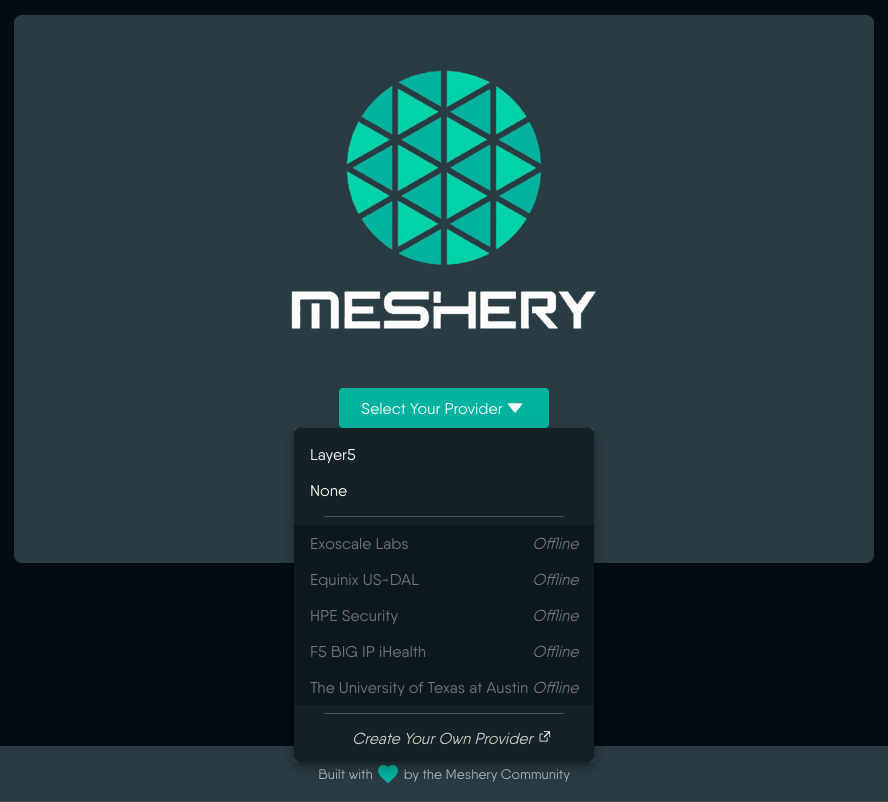
  <figcaption>Figure: Selecting a provider in Meshery</figcaption>

## Types of providers

There are two types of providers defined in Meshery, `local` and `remote`.

- The **Local** provider is built-into Meshery.
- **Remote providers** can be implemented by anyone or an organization that wishes to integrate with Meshery. Any number of Remote providers may be available in your Meshery deployment.

### Identity and Multi-Tenancy

The provider you choose determines whether Meshery is single-user or multi-tenant:

- With the **Local** provider, Meshery is **single-user**: there is no authentication, no identity, and no multi-tenancy. There are no [Organizations](/concepts/logical/organizations/), teams, or shared ownership — every resource belongs to the single local user.
- With a **Remote Provider**, Meshery is **multi-user and multi-tenant**. The provider supplies identity, and [Organizations](/concepts/logical/organizations/) become the unit of tenancy: they group users, own all Workspaces, Environments, Designs, and Connections, and carry the roles and permissions that govern access. A Remote Provider can extend an Organization further with its own identity provider, custom domain, and branding.

This is the central reason to use a Remote Provider for any shared, ongoing, or public-facing Meshery deployment — see [Recommended Production Deployment Settings](#recommended-production-deployment-settings) below. For the tenancy model itself, see [Organizations](/concepts/logical/organizations/).

### Default Installation Configuration

By default, Meshery installations **do not have a provider preselected**. This is an intentional design choice: upon first launch, users are presented with the provider selection UI, allowing them to make an informed choice among all available providers.

<div class="alert alert-info" role="alert"><div class="h4 alert-heading" role="heading">Why no default provider?</div>

 
It might be tempting to preselect the Local provider (\"Local\") as the default; however, doing so would preclude selection of any other provider by new users who are unaware of other options being available. By leaving the provider unset, all users (whether individual or team-based) are presented with the full range of available providers on first use. 
</div>


### Recommended Production Deployment Settings

For production deployments, consider the following security best practices regarding provider selection:

- **Do not pre-select a provider** in the default installation configuration. Allow users to choose their provider at startup.
- **Use a Remote Provider** for production deployments to enforce user authentication and authorization, especially for public-facing Meshery instances.
- **Enforce a specific provider** using the `PROVIDER` environment variable only when you have a clear operational requirement to do so, such as locking a deployment to a particular identity provider.
- **Use `mesheryctl system provider set`** to explicitly configure a provider for a given context when needed.
- **Use `mesheryctl system provider reset`** to clear an enforced provider and return to the provider selection UI.
- **Vet the provider before you allow it.** A Remote Provider's capabilities document names the extension package Meshery downloads and loads, so selecting a provider decides whose code runs in Meshery UI's browser context and, where the package carries a server-side plugin, in-process inside Meshery Server. Prefer first-party and maintained providers, and pin what you have reviewed with [`SKIP_DOWNLOAD_EXTENSIONS`](#skip_download_extensions) and [`PROVIDER_CAPABILITIES_FILEPATH`](#provider_capabilities_filepath). See [Trusting an extension](/installation/production/security-hardening/#trusting-an-extension) for the full production guidance.

<div class="alert alert-warning" role="alert"><div class="h4 alert-heading" role="heading">Provider selection is a code-trust decision</div>


Beyond identity and persistence, the provider you select supplies loadable extension code.
Treat adding an unfamiliar Remote Provider the way you would treat adding an unfamiliar
binary to a production host. See
[Trusting an extension](/installation/production/security-hardening/#trusting-an-extension)
and
[Authentication, Authorization & Identity](/installation/production/authentication-and-identity/).
</div>


#### AI Provider Usage in Production

When integrating AI providers with Meshery, apply the following additional controls:

- **Prefer local inference for sensitive environments** — use locally hosted models to prevent sensitive workload data from leaving your network boundary.
- **Rotate API keys and restrict to minimum scopes** — issue short-lived, least-privilege credentials and rotate them on a defined schedule.
- **Limit outbound network access to known provider endpoints** — use egress policies or firewall rules to allow only the specific AI provider hostnames your deployment requires.
- **Avoid logging prompts or model responses unless required** — treat model inputs and outputs as potentially sensitive; disable verbose logging by default and apply retention limits if logging is necessary.
- **Define an incident response plan for leaked API keys** — document revocation steps, affected-system audit procedures, and communication channels before an incident occurs.

### Remote Providers

The use of a Remote Provider, puts Meshery into multi-user mode and requires user authentication. This provides security for the public-facing Meshery UI as the remote provider enforces identity with authentication and authorization. You should also use a remote provider when your use of Meshery is ongoing or used in a team environment (used by multiple people). This can be seen when using Meshery Playground, where a user is prompted to login through the _Meshery Cloud_ remote provider. Visit [Meshery Playground](https://playground.meshery.io/) to experience this.

A specific provider can be enforced in a Meshery instance by passing the name of the provider with the env variable `PROVIDER`. This applies to both remote and local providers.

Name: **"Meshery"** (default), URL: `https://cloud.meshery.io`

- Enforces user authentication.
- Long-term term persistence.
- Save environment setup.
- Retrieve performance test results.
- Events are stored locally and can be published to remote provider. [Read more about server events](/project/contributing/contributing-server-events/)

Name: **"Digital Ocean"**, URL: `https://meshery.digitalocean.com`

- Alternate remote provider, also shipped in the default `PROVIDER_BASE_URLS` list.
- Same capability surface as the Meshery remote provider; choose based on your organization's account.

#### Example remote provider

Name: **"Acme"**

- Enforces user authentication.
- Long-term term persistence.
- Save environment setup.
- Retrieve performance test results.
- Events are stored locally and can be published to remote provider. [Read more about server events](/project/contributing/contributing-server-events/)
- Free to use.

### Local Provider

The use of the Local Provider, **"Local"**, puts Meshery into a single-user mode and does not require authentication. Use the Local provider when your use of Meshery is intended to be shortlived.

Name: **"Local"** (legacy alias: **"None"**)

- No user authentication.
- Immediate login - users are redirected directly to the dashboard without authentication prompts.
- Container-local storage of test results. Ephemeral.
- Environment setup not saved.
- No performance test result history.
- Server events are stored locally in database. [Read more about server events](/project/contributing/contributing-server-events/)
- Free to use.

#### Login Behavior

When the Local Provider is selected, users are immediately redirected to the Meshery dashboard without any authentication challenges. The login flow for the **"Local"** provider:

1. User selects **"Local"** provider from the provider selection UI (or it's enforced via the `PROVIDER` environment variable; `PROVIDER=None` is still accepted as a legacy alias)
2. The provider cookie is set and user is redirected to `/user/login`
3. `InitiateLogin` immediately redirects to `/` (dashboard) or to the originally requested page if a deep-link was preserved
4. User begins working with Meshery without any authentication barriers

This streamlined flow makes the Local Provider ideal for quick evaluations, demos, and single-user scenarios where authentication overhead is unnecessary.

## Provider Login Flow

Understanding how provider selection leads to authentication and dashboard access is important for both users and integrators.

### Interactive (Browser) Flow

1. **Provider Selection**: User visits Meshery and is presented with the provider selection UI at `/provider` (unless a provider is enforced via the `PROVIDER` environment variable)
2. **Provider Activation**: User selects a provider → Meshery sets a `meshery-provider` cookie and redirects to `/user/login?provider=<name>`
3. **Login Initiation**: The `/user/login` route resolves the provider and calls the provider's `InitiateLogin` method:
   - **For "Local"**: Immediately redirects to `/` (dashboard) or to the deep-link target if one was preserved
   - **For Remote Providers**: Redirects to the remote provider's OAuth login page (e.g., GitHub, Google)
4. **Post-Authentication**: After successful authentication, user is redirected to the dashboard or originally requested page

### Enforced Provider Flow

When the `PROVIDER` environment variable is set (e.g., `PROVIDER=Local` or `PROVIDER=Meshery`):

1. At **server boot**, only that provider is registered. If the value is a remote, the Local Provider is not registered at all.
2. Provider selection UI is bypassed; cookie, header, and `?provider=` cannot select a different provider.
3. User is redirected directly to `/user/login`.
4. Login flow proceeds as described above based on provider type.
5. If `PROVIDER` is set but cannot be resolved to a registered provider, Meshery refuses to start (it does not fall back to the chooser).
6. Changing `PROVIDER` on an existing deployment requires a restart. It is not a build-time flag. Re-login is required; data does not migrate between providers.

Boot-time work is unaffected by the pin. Model seeding, connection seeding, and
key seeding all run before any user request and are provider-independent, so a
pinned deployment seeds exactly what an unpinned one does, and the system events
raised while seeding (the `For registrant ... imported ...` summaries and any
registration failures) are persisted to the same `events` table either way.

<div class="alert alert-warning" role="alert"><div class="h4 alert-heading" role="heading">Contributing: do not look a provider up by name at boot</div>


Because enforcement empties the registration map of everything but the pinned
provider, server code that runs at boot must not resolve a provider by name from
`HandlerConfig.Providers` - `Providers["Local"]` yields a nil `Provider` on a
pinned deployment. Code needing to persist an event outside a user request takes
`HandlerConfig.SystemEventPersister` instead, which is wired directly to the
database and is independent of which providers are registered. Reaching into the
registration map for a sink is what made a pinned deployment panic at boot in
[#21584](https://github.com/meshery/meshery/issues/21584). Request-path code is
unaffected: it receives its provider from the request context, which enforcement
resolves consistently.
</div>


<div class="alert alert-warning" role="alert"><div class="h4 alert-heading" role="heading">Contributing: a seeding fault must not terminate the server</div>


Every boot seeding stage runs through `models.RunSeedStage`, which recovers a
panic raised inside that stage, logs it as
[`meshery-server-1483`](/reference/error-codes/) with
the stage name and stack trace, and lets the remaining stages run. A Meshery
Server with an incomplete registry is still useful and its operator can read the
error; one that exits at boot leaves them a crash loop and no UI to read it in.

`recover` reaches only the goroutine that deferred it, so wrapping a stage does
not cover a goroutine that stage spawns - a fault there would still take the
process down. A stage that spawns one therefore recovers at its own spawn site
and reports through the same `ErrSeedingStagePanic`, making the failure
indistinguishable in the log from one `RunSeedStage` caught itself. `SeedKeys`
(`server/models/keys_helper.go`), which parses `keys.csv` on a spawned
goroutine, is the only seeding callee that spawns one today; give any new one
the same deferred recover rather than widening `RunSeedStage`, which cannot
reach a child goroutine. Both halves are pinned by tests in `server/models`:
`TestRunSeedStageRecoversPanic` and
`TestSeedKeysChildGoroutinePanicIsContained`.
</div>


### Deep-Link Preservation

Meshery preserves the originally requested in-app destination - its path and query, plus its fragment where the browser captured one - on the entry paths that capture it: an unauthenticated first visit, which is routed through provider selection (`/provider`) with the page attached, and the **Sign In** control offered during an anonymous session, which sends the page the user is standing on. A session that expires mid-use takes neither path - it is sent to `/auth/login` carrying that page's own query but not the page itself - so re-authentication lands on the default page rather than the original destination.

- Where the destination is captured, the in-app URL is base64-encoded into a `ref` query parameter
- Meshery owns that destination for the rest of the flow: `InitiateLogin` records it in a one-shot, `HttpOnly` cookie on Meshery's own domain rather than trusting the value back out of the provider's auth chain, where a custom-domain bounce can rewrite it. A login carrying no `ref` deletes any cookie an abandoned earlier attempt left behind, so a stale destination cannot outrank this login's own
- When the provider returns to `/api/user/token`, that cookie supplies the destination and is deleted. Only if it is absent or empty does Meshery fall back to the `?ref=` the provider echoed back. A deployment that offers anonymous sessions writes no cookie at all, because its exit resolves the destination from the request in hand - which is how a Sign In taken during an anonymous session keeps its query
- The same validation gate runs at every entry point: the Local Provider's login, the Remote Provider's token handler, and the anonymous-session exit
- If validation fails, or no `ref` is present at all, the user lands on the default page for that provider - the dashboard (`/`) or a [provider-defined redirect](#provider-defined-redirects) target

**Example**: A user who has not yet selected a provider visits `https://meshery.example.com/extension/meshmap?mode=design` → redirected to provider selection and on to login, with the page carried in a `ref` parameter → after login, automatically returned to the extension with `mode=design` intact.

<div class="alert alert-info" role="alert"><div class="h4 alert-heading" role="heading">Deep-Link Security</div>


Deep-link targets are validated to prevent open redirect vulnerabilities and post-login redirect loops:

- A relative in-app path is used as-is. An absolute URL is accepted only when its host is Meshery's own, and is then reduced to its path and query; every other host is rejected. The host compared against is taken from `MESHERY_SERVER_CALLBACK_URL` when set, falling back to the request's `Host` - so a rewritten `Host` header cannot widen the test
- Protocol-relative values (`//host`) and backslashes in the path are rejected, because a browser reads either as the start of a new authority
- Routes whose job is to *start* authentication are rejected as destinations, otherwise the browser immediately re-enters the OAuth dance and the original target is lost: `/user/login`, `/auth/login`, `/api/user/token`, `/provider`, and `/login` (the Remote Provider's own login page, which a custom-domain bounce can synthesize into the `ref` it echoes back). The check runs on the normalized target as well as the decoded one, so encoded or fragment-hidden traversal onto one of those routes is caught too
</div>


## Runtime Configuration Options

Meshery provides runtime configuration options to control provider behavior:

For the full server-wide reference, including provider-independent settings such as tracing, policy evaluation, and storage paths, see [Meshery Server Environment Variables](/installation/advanced/environment-variables/).

### PROVIDER

This environment variable hard-enforces a specific provider at server boot: only that provider is registered, the chooser is skipped, and client hints cannot override it. This is useful for:
- Dedicated deployments where only one provider should be available
- Automated environments and CI/CD pipelines
- Simplified user experience when provider choice is predetermined

Accepted values:
- `Local` - Enforces the Local Provider (no authentication). `None` is accepted as a legacy alias.
- `Meshery` - Enforces the Meshery (Meshery Cloud) Remote Provider
- Any other registered remote provider name

Example: `PROVIDER=Local`

When set, users are automatically directed to the specified provider's login flow upon accessing Meshery.

### PROVIDER_CAPABILITIES_FILEPATH

This environment variable allows you to specify a local file path to load provider capabilities from a static JSON file instead of fetching them from the remote provider's `/capabilities` endpoint. This is useful for:
- Offline development and testing
- Environments with restricted network access
- Ensuring consistent provider capabilities across deployments

Example: `PROVIDER_CAPABILITIES_FILEPATH=/path/to/capabilities.json`

### SKIP_DOWNLOAD_EXTENSIONS

This boolean environment variable controls whether Meshery downloads and refreshes provider extension packages. When set to `true`, Meshery will skip downloading extension packages even when new versions are available. This is particularly useful for:
- Development environments where you want to use locally modified extensions
- Deployments where extensions are pre-packaged or managed separately
- Reducing startup time and network bandwidth usage
- Preventing automatic updates to extension packages

Default: `false` (extensions are downloaded/refreshed)

Example: `SKIP_DOWNLOAD_EXTENSIONS=true`

**Note:** Extension downloads occur during:
- User login (via the TokenHandler)
- Provider capability refresh operations
- Release channel updates

When `SKIP_DOWNLOAD_EXTENSIONS` is enabled, existing extension packages will still be loaded if present, but no new versions will be retrieved.

**Security use:** because existing packages continue to load, this variable doubles as a
pin. Setting it to `true` holds a production deployment on an extension package you have
already reviewed instead of accepting whatever the provider publishes next. Pair it with
[`PROVIDER_CAPABILITIES_FILEPATH`](#provider_capabilities_filepath) when the capability set
itself should not drift, and see
[Trusting an extension](/installation/production/security-hardening/#trusting-an-extension).

## Design Principles: Meshery Remote Provider Framework

Meshery's Remote Provider extensibility framework is designed to enable the following functionalities:

1. **Pluggable UI Functionality**
   - Out-of-tree custom UI components with seamless user experience.
   - A system of remote retrieval of extension packages (ReactJS components and Golang binaries).

1. **Pluggable Backend Functionality**
   - Remote Providers have any number of capabilities unbeknownst to Meshery.

1. **Pluggable AuthZ**
   - Design an extensible role based access control system such that Remote Providers can determine their own set of controls. Remote Providers to return JWTs with custom roles, permission keys and permission keychains.

## Building a Provider

Meshery interfaces with providers through a Go interface. The Provider implementations have to be placed in the code and compiled together today. A Provider instance will have to be injected into Meshery when the program starts.

Meshery keeps the implementation of Remote Providers separate so that they are brought in through a separate process and injected into Meshery at runtime (OR) change the way the code works to make the Providers invoke Meshery.

### Verifying Compatibility With Golang Version Update

When Meshery is updated to a newer version of Golang, extension providers need to ensure their integrations remain compatible with the updated version. Changes in the Golang version can lead to compatibility issues, so it’s important to update your extension to align with Meshery’s new environment. For a detailed guide on how to verify and address any compatibility issues, refer to this [guide on verifying compatibility](./verify-compatibility).

### Remote Provider Extension Points

Interwoven into Meshery’s web-based user interface are a variety of extension points. Each extension point is carefully carved out to afford a seamless user experience. Each extension point is identified by a name and type. The following Meshery UI extension points are available:

|**Name**   |**Type**   | **Description**  |
|---|---|---|
|navigator |Menu Items   |This is supposed to be a full page extension which will get a dedicated endpoint in the meshery UI. And will be listed in the meshery UI’s navigator/sidebar. Menu items may refer to full page extensions.   |
|user_prefs   |Single Component   |This is supposed to be remote react components which will get placed in a pre-existing page and will not have a dedicated endpoint. As of now, the only place where this extension can be loaded is the “User Preference” section under meshery settings.   |
|account   |Full Page   |Remote Reactjs components (or other) are placed in a pre-existing page and will have dedicated endpoint: `/extension/account`.   |
|collaborator |Single Component|This is supposed to be remote react components which will get placed in a pre-existing page and will not have a dedicated endpoint. Currently, placed at the Header component of Mehery UI. Its work is to show active Meshery users under the same remote provider.|
  |/extension/\<your name here>|Full Page|The Provider package is unzipped into Meshery server filesystem under `/app/provider-pkg/<package-name>`.|

Remote Providers must fulfill the following endpoints:

1. `/login` - return valid token
1. `/logout` - invalidating token
1. `/capabilities` - return capabilities.json

## UI Extension Points

All UI extensions will be hosted under the endpoint `<mesheryserver:port/provider>`.

### UserPrefs

The UserPrefs extension point expects and loads a component to be displayed into `/userpreferences` page.

### Navigator

The Navigator extension point loads a set of menu items to be displayed in the menu bar on the left hand side of the Meshery UI.

## Provider-Defined Redirects

Remote Providers can define custom URL redirects through the `redirects` field in the capabilities response. This allows providers to dynamically control how certain URL paths are handled by the Meshery server, enabling seamless navigation experiences for users.

### How Redirects Work

When Meshery server receives a request for a specific URL path, it checks if the connected Remote Provider has defined a redirect for that path in its capabilities. If a matching redirect is found, the server issues an HTTP permanent redirect (308) to the target URL.

### Configuring Redirects

Redirects are defined as a key-value map in the provider's capabilities response, where:
- **Key**: The source URL path to intercept (e.g., `/`)
- **Value**: The destination URL to redirect to (e.g., `/extension/meshmap`)

Example configuration in the capabilities response:


<pre class="codeblock-pre">
	<div class="codeblock">
		<code class="clipboardjs">&#34;redirects&#34;: {
  &#34;/&#34;: &#34;/extension/meshmap&#34;,
  &#34;/dashboard&#34;: &#34;/extension/meshmap/dashboard&#34;
}</code>
	</div>
</pre>


### Use Cases

1. **Default Landing Page**: Redirect users from the root path (`/`) to a custom extension page.
2. **Custom Navigation**: Guide users to specific extension pages based on their workflow.
3. **URL Aliasing**: Create shorter or more memorable URLs that redirect to extension endpoints.

<div class="alert alert-info" role="alert"><div class="h4 alert-heading" role="heading">Note</div>


Redirects are evaluated before serving UI content. Only exact path matches are redirected.
</div>


## Capabilities Endpoint Example

Meshery Server will proxy all requests to remote provider endpoints. Endpoints are dynamically determined and identified in the _**capabilities**_ section of the `/capabilities` endpoint. Providers as an object have the following attributes (this must be returned as a response to `/capabilities` endpoint):
<details>
<summary>Capabilities Endpoint Example</summary>


<pre class="codeblock-pre">
	<div class="codeblock">
		<code class="clipboardjs">{
  &#34;providerType&#34;: &#34;remote&#34;,
  &#34;packageVersion&#34;: &#34;v0.1.0&#34;,
  &#34;packageURL&#34;: &#34;https://&lt;hostname&gt;&gt;/meshery-extensions-packages/provider.tar.gz&#34;,
  &#34;providerName&#34;: &#34;Meshery&#34;,
  &#34;providerDescription&#34;: [
    &#34;Persistent sessions&#34;,
    &#34;Save environment setup&#34;,
    &#34;Retrieve performance test results&#34;,
    &#34;Free use&#34;
  ],
  &#34;extensions&#34;: {
    &#34;navigator&#34;: [
      {
        &#34;title&#34;: &#34;Designer&#34;,
        &#34;href&#34;: {
          &#34;uri&#34;: &#34;/meshmap&#34;,
          &#34;external&#34;: false
        },
        &#34;component&#34;: &#34;/provider/navigator/meshmap/index.js&#34;,
        &#34;icon&#34;: &#34;/provider/navigator/img/meshmap-icon.svg&#34;,
        &#34;link:&#34;: true,
        &#34;show&#34;: true,
        &#34;children&#34;: [
          {
            &#34;title&#34;: &#34;View: Single Mesh&#34;,
            &#34;href&#34;: {
              &#34;uri&#34;: &#34;/meshmap/mesh/all&#34;,
              &#34;external&#34;: false
            },
            &#34;component&#34;: &#34;/provider/navigator/meshmap/index.js&#34;,
            &#34;icon&#34;: &#34;/provider/navigator/img/singlemesh-icon.svg&#34;,
            &#34;link&#34;: false,
            &#34;show&#34;: true
          }
        ]
      }
    ],
    &#34;account&#34;: [
      {
          &#34;title&#34;: &#34;Overview&#34;,
          &#34;onClickCallback&#34;: 1,
          &#34;href&#34;: {
              &#34;uri&#34;: &#34;/account/overview&#34;,
              &#34;external&#34;: false
          },
          &#34;component&#34;: &#34;/provider/account/profile/overview.js&#34;,
          &#34;link&#34;: true,
          &#34;show&#34;: true,
          &#34;type&#34;: &#34;full_page&#34;
      },
      {
          &#34;title&#34;: &#34;Profile&#34;,
          &#34;onClickCallback&#34;: 1,
          &#34;href&#34;: {
              &#34;uri&#34;: &#34;/account/profile&#34;,
              &#34;external&#34;: false
          },
          &#34;component&#34;: &#34;/provider/account/profile/profile.js&#34;,
          &#34;link&#34;: true,
          &#34;show&#34;: true,
          &#34;type&#34;: &#34;full_page&#34;
      },
      {
          &#34;title&#34;: &#34;API Tokens&#34;,
          &#34;onClickCallback&#34;: 1,
          &#34;href&#34;: {
              &#34;uri&#34;: &#34;/account/tokens&#34;,
              &#34;external&#34;: false
          },
          &#34;component&#34;: &#34;/provider/account/profile/tokens.js&#34;,
          &#34;link&#34;: true,
          &#34;show&#34;: true,
          &#34;type&#34;: &#34;full_page&#34;
      }
    ],
    &#34;userPrefs&#34;: [
      {
        &#34;component&#34;: &#34;/provider/userprefs/meshmap-preferences.js&#34;
      }
    ],
    &#34;collaborator&#34;: [
      {
        &#34;component&#34;: &#34;/provider/collaborator/avatar.js&#34;
      }
    ]
  },
  &#34;redirects&#34;: {
    &#34;/&#34;: &#34;/extension/meshmap&#34;
  },
  &#34;capabilities&#34;: [
    {
        &#34;feature&#34;: &#34;sync-prefs&#34;,
        &#34;endpoint&#34;: &#34;/user/preferences&#34;
    },
    {
        &#34;feature&#34;: &#34;persist-results&#34;,
        &#34;endpoint&#34;: &#34;/results&#34;
    },
    {
        &#34;feature&#34;: &#34;persist-result&#34;,
        &#34;endpoint&#34;: &#34;/result&#34;
    },
    {
        &#34;feature&#34;: &#34;persist-metrics&#34;,
        &#34;endpoint&#34;: &#34;/result/metrics&#34;
    },
    {
        &#34;feature&#34;: &#34;persist-smp-test-profile&#34;,
        &#34;endpoint&#34;: &#34;/user/test-config&#34;
    },
    {
        &#34;feature&#34;: &#34;persist-performance-profiles&#34;,
        &#34;endpoint&#34;: &#34;/user/performance/profiles&#34;
    },
    {
        &#34;feature&#34;: &#34;persist-schedules&#34;,
        &#34;endpoint&#34;: &#34;/user/schedules&#34;
    },
    {
        &#34;feature&#34;: &#34;persist-meshery-patterns&#34;,
        &#34;endpoint&#34;: &#34;/patterns&#34;
    },
    {
        &#34;feature&#34;: &#34;persist-meshery-filters&#34;,
        &#34;endpoint&#34;: &#34;/filters&#34;
    },
    {
        &#34;feature&#34;: &#34;persist-meshery-applications&#34;,
        &#34;endpoint&#34;: &#34;/applications&#34;
    },
    {
        &#34;feature&#34;: &#34;persist-meshery-pattern-resources&#34;,
        &#34;endpoint&#34;: &#34;/patterns/resource&#34;
    },
    {
        &#34;feature&#34;: &#34;meshery-patterns-catalog&#34;,
        &#34;endpoint&#34;: &#34;/patterns/catalog&#34;
    },
    {
        &#34;feature&#34;: &#34;meshery-filters-catalog&#34;,
        &#34;endpoint&#34;: &#34;/filters/catalog&#34;
    },
    {
        &#34;feature&#34;: &#34;clone-meshery-patterns&#34;,
        &#34;endpoint&#34;: &#34;/patterns/clone&#34;
    },
    {
        &#34;feature&#34;: &#34;clone-meshery-filters&#34;,
        &#34;endpoint&#34;: &#34;/filters/clone&#34;
    },
    {
        &#34;feature&#34;: &#34;share-designs&#34;,
        &#34;endpoint&#34;: &#34;/api/content/design/share&#34;
    },
    {
        &#34;feature&#34;: &#34;persist-connection&#34;,
        &#34;endpoint&#34;: &#34;/api/connection&#34;
    }
  ]
}</code>
	</div>
</pre>

</details>

#### Meshery Server Registration

Every Meshery server is capable of registering itself with the remote provider, considering that remote provider supports this feature as a capability.
On successful authentication with the remote provider, Meshery server registers itself by sending a POST request to the remote provider through the `persist-connection` capability. The body of the request should include information so as to uniquely indentify Meshery server and its status.

Example of the request body:


<pre class="codeblock-pre">
	<div class="codeblock">
		<code class="clipboardjs">{
  &#34;server_id&#34;: &#34;xxxx-xxxxx-xxxx-xxxx&#34;,
  &#34;server_version&#34;: &#34;vx.x.x&#34;,
  &#34;server_build-sha&#34;: &#34;xxxx-xxxxx&#34;,
  &#34;server_location&#34;: &#34;&lt;protocol&gt;://&lt;hostname&gt;:&lt;port&gt;&#34;
}</code>
	</div>
</pre>


## Configurable OAuth Callback URL

As of the release `v0.5.39`, Meshery Server has extended its capability to configure the callback URL for connected _Remote Providers_. This is helpful when you are deploying Meshery behind an ingress gateway or reverse proxy. You can specify a custom, redirect endpoint for the connected Remote Provider.
Let's understand this through an example deployment scenario below.

### Example Deployment Scenario: Meshery Cloud, Istio, and Azure Kubernetes Service

User has deployed the Meshery behind a Istio Ingress Gateway and the Istio is also behind an Application Gateway (e.g. AKS Application Gateway). Generally, when you use a GitHub Remote Provider for authentication, it redirect the request to the Istio Ingress Gateway FQDN. In this setup, redirection won't be successful because the Ingress Gateway is behind an additional Application Gateway. In this case, you have to define where the request should be redirected once it is authenticated from GitHub.

**_SOLUTION_**

You can define a custom callback URL by setting up the `MESHERY_SERVER_CALLBACK_URL` environment variable while installing Meshery.

**Example using Helm**

First, construct the URL in the format
```https://[CUSTOM_URL]/api/user/token```

- Where `[CUSTOM_URL]` is the URL where **Meshery server** will be or is installed. For example, `https://k8s-staging.test.io/`.
- And `api/user/token` is the **Auth Endpoint** and is append at the end of your custom URL.

So, the final URL would look similar to
```https://k8s-staging.test.io/api/user/token```

<div class="alert alert-info" role="alert"><div class="h4 alert-heading" role="heading">Note</div>


Callback URL is not the same as Provider URL. In scenarios where Meshery server and Provider is installed on same server, pay attention to paths or subdomains.
</div>


Next, set the `MESHERY_SERVER_CALLBACK_URL` variable when running the `helm install`. Below is an example:


<pre class="codeblock-pre">
	<div class="codeblock">
		<code class="clipboardjs">helm install meshery meshery/meshery --namespace meshery --set env.MESHERY_SERVER_CALLBACK_URL=https://k8s-staging.test.io/api/user/token</code>
	</div>
</pre>


**NOTE**

If Meshery server is accessible in a path of the URL such as `https://k8s-staging.test.io/meshery`, then the callback URL will be `https://k8s-staging.test.io/meshery/api/user/token`.

## Managing your Remote Provider Extension Code

Remote Provider extensions are kept out-of-tree from Meshery (server and UI). You might need to build your extensions under the same environment and set of dependencies as Meshery. The Meshery framework of extensibility has been designed such that in-tree extensions can be safely avoided while still providing a robust platform from which to extend Meshery’s functionality. Often, herein lies the delineation of open vs. closed functionality within Meshery. Remote Providers can bring (plugin) what functionality that they want behind this extensible interface (more about Meshery extensibility), at least that is up to the point that Meshery has provided a way to plug that feature in.

Offering out-of-tree support for Meshery extensions means that:

1. source code to your Meshery extensions are not required to be open source,
1. liability to Meshery’s stability is significantly reduced, avoiding potential bugs in extended components.

Through clearly defined extension points, Meshery extensions may be offered as closed source capabilities that plug into open source Meshery code. To facilitate integration of your Meshery extensions, you might automate the building and releasing of your separate, but interdependent code repositories. You will be responsible for sustaining both your ReactJS and Golang-based extensions.
