# Contributing to Meshery UI End-to-End Tests
> How to contribute to end-to-end testing in Meshery UI using Playwright.
---
LLMS index: [llms.txt](/llms.txt)
---
To automate functional integration and end-to-end testing Meshery uses [Playwright](https://playwright.dev/) as one of the tools to automate browser testing. End-to-end tests run with each pull request to ensure that the changes do not break the existing functionality.
## Prerequisites:
Before diving into Meshery's testing environment, certain prerequisites are necessary:
- A verified account in your chosen provider which integrate with Meshery.
- A compatible browser such as Chromium, Chrome, or Firefox.
- Installations of Golang, NodeJS, and Makefiles for Native OS build (Optional for docker based build).
- Kubernetes clusters (Required for connection to Kubernetes test cases)
- Already have [Meshery Adapters](https://docs.meshery.io/concepts/architecture/adapters) up and running (Required for adapters test cases)
## Setting up environment variable
Credentials are needed only by the `chromium-meshery-provider` project, which authenticates against a remote provider. The `chromium-local-provider` project needs none, so a contributor running only the Local provider suite can skip this section. To run `chromium-meshery-provider`, configure one of two credential sets - a token on its own, or an email and password pair:
• `PROVIDER_TOKEN` (Required unless the email and password below are both set): Your provider token, can be generated from an account registered within your provider
• `REMOTE_PROVIDER_USER_EMAIL` (Required unless `PROVIDER_TOKEN` is set): The email associated with your account within your provider.
• `REMOTE_PROVIDER_USER_PASSWORD` (Required unless `PROVIDER_TOKEN` is set): The password associated with your account within your provider.
Either `PROVIDER_TOKEN` on its own, or both `REMOTE_PROVIDER_USER_EMAIL` and `REMOTE_PROVIDER_USER_PASSWORD`, is enough to authenticate. Without one of those pairs the `remote-setup` project fails, and Playwright reports every `chromium-meshery-provider` test as "did not run" - one honest failure naming the missing variable, rather than a run that appears to have tested the remote provider. Do not convert that failure into a skip: Playwright only collapses a dependent project when its setup **fails**, so a skipped setup leaves all of those tests scheduled and they die individually on the storage state file that was never written. Both shapes are on record for this same defect - run `31039121068` (failing setup) reported 1 failure and ran 0 `chromium-meshery-provider` tests, while run `31701664917` (skipping setup) reported 62 failures and 23 skips, every one of them a `user-meshery-provider.json` ENOENT that says nothing about authentication. One honest failure is the goal; 62 derived ones are noise that overstates the problem.
In CI these come from the `REMOTE_PROVIDER_TEST_USER_TOKEN` organization secret, which holds a maintained token for a purpose-built remote-provider test user - the same secret `mesheryctl-e2e.yaml` uses. The older `PROVIDER_TOKEN` organization secret is a static token that expired and must not be used. Only push builds run the remote-provider project (`npm run test:e2e:ci:full`); pull request builds run `npm run test:e2e:ci:local`, which covers the Local provider only, so pull requests from forks - which cannot read secrets - are unaffected.
That secret must be referred to by the same name in the caller (`.github/workflows/build-and-test.yml`) and in the reusable workflow (`.github/workflows/test-e2e.yml`), and `test-e2e.yml` asserts it is non-empty in a pre-flight step before checkout, Kind, Docker or the browser download, so a misconfiguration fails in seconds rather than after the roughly three minutes of Kubernetes-in-Docker bring-up that precede the first test. Do not reintroduce an alias between the two: a missing secret expands to the empty string rather than erroring, and an alias is exactly what let `test-e2e.yml` read a `REMOTE_PROVIDER_TOKEN` secret that existed in neither the repository nor the organization - from 2026-05-18 until the verdict gate below made it visible on 2026-08-05 - while the wrong name still looked deliberate in review.
During the setup phase, Playwright utilizes these environment variables to log in and store credentials securely in the `playwright/.auth` directory. To protect sensitive data, the `.gitignore` file is configured to exclude `.env` files and any JSON files within the `/playwright/.auth` directory from the GitHub repository.
Locally, the dotenv file these variables are read from is **`ui/.env`** - `ui/tests/e2e/env.js` loads it, so it applies however Playwright is invoked. The repository-root `.env` also works when you go through the make targets (`make ui-test`, `make ui-test-e2e-full`, `make ui-test-e2e-local`), because each of those sources it into the environment before running Playwright. A real environment variable always wins over a value in `ui/.env`. `ui/tests/e2e/.env.example` is the template to copy there (`cd ui && cp tests/e2e/.env.example .env`); note that `ui/tests/e2e/.env` itself is read by nothing despite having its own `.gitignore` entry - credentials placed there are silently ignored.
There are several tools to help you to working with environment variables locally for each project such as [direnv](https://github.com/direnv/direnv), it can work across multiple shell such as Bash, Powershell, Oh my zsh, Fish, etc
## Starting up Meshery UI and Server
There are a few ways to set up the Meshery UI and server, but for end-to-end testing, we aim to get as close to a production environment as possible. We know developers might need to make some tweaks for UI and Server. Rebuilding the whole project can take time, and we don’t support hot reload because it’s more for development than for end-to-end testing.
Several Test may break
Some test cases required you to have kubernetes cluster and build meshery adapter as well, be aware of that. Which is out of scope for this documentation
### Native OS Build (Recommended)
This approach is very quick to build, but also dependent on your operating system, so you need to have all dependencies necessary to be able compile and running the server.
- Install & Build the NextJS application for both the UI and UI Provider
make ui-build
- Compile the Golang into binary file for Meshery Server
make build-server
- Run the Meshery Server on localhost port 9081
make server-binary
### Meshery CLI
There is also Meshery CLI which can help you run the UI and Server, for more detail, you go to [Meshery CLI documentation](https://docs.meshery.io/project/contributing/cli/ux-guide#process)
### Docker Based Build
Alternatively, a Docker-based setup can be utilized, simplifying the process, and ensuring consistency across different environments. It is closer to the production environment than the native solution but slower in terms of build time.
- Build the docker container locally:
make docker-testing-env-build
- Run the docker container on port 9081
make docker-testing-env
## Setup Playwright
For Playwrights, always try to use a native OS whenever possible. The Docker-based approach is intended only for unsupported OSes and is generally not recommended because it runs on top of Ubuntu images, which can be redundant if you already using Ubuntu or Windows.
### Playwright on Native OS (Recommended)
Setup playwright:
make ui-test-setup
Run the all project and test cases:
make ui-test
### Playwright server on docker based image
The first step is to pull the docker image from [Azure Container Registry](https://mcr.microsoft.com/en-us/product/playwright/tags) where the playwright stores their image using this command:
Keep in mind this is just for development purposes inside your local system and don't try to expose your container network to the host system using --network host on production or CI
In the last step go to ui folder,
cd ui;
## Run the test cases with Playwright CLI
A local run needs three things, and the failure you get when one of them is missing does not name the thing that is missing:
1. **Build the provider UI first** with `make ui-provider-build`. A fresh source checkout has no `provider-ui/out`, so the server returns 404 for `/provider`; every project's auth setup then dies on a provider-dropdown click timeout that reads like a UI bug.
2. **A server on `:9081`** (`make server`, then choose the Local provider) and the UI dev server on `:3000` (`make ui`).
3. **`MESHERY_SERVER_URL=http://localhost:3000`** on the Playwright run. The dev server proxies `/api`, `/provider` and the auth routes through to `:9081`, and the built UI that `:9081` would otherwise serve does not exist in a source checkout.
There are several options we can use to run the test cases, in CLI:
To run playwright UI mode using the browser, you can add `--ui` in the cli, for example:
npx playwright test --ui
If you are using playwright from docker, you can use `--ui-port=`, for example:
npx playwright test --ui-port=8080
To run playwright for specific project only, for example meshery-provider, you can run this command:
npx playwright test --ui --project=chromium-meshery-provider
To run specific test, you can add the test file location, for example:
npx playwright test --ui --project=chromium-meshery-provider tests/e2e/service-mesh-performance.spec.js
For more detail, you can read the [Playwright Cli docs](https://playwright.dev/docs/test-cli)
## Testing Meshery & Local Provider
By default our test cases is running against both Meshery and Local Provider, we are utilizing playwright feature such as:
- StorageState: In meshery [setup auth](https://github.com/meshery/meshery/blob/master/ui/tests/e2e/auth.setup.js), we have 2 storage state, which store a session for Meshery and Local provider.
- Project: After the setup completes, it will run the project-based test depending on which storage state for the Local Provider and one for the Meshery Provider
- Test Parameterize: In the Local provider we are limiting some features to test against. For the missing features, we leverage this playwright feature to check or even skip the test. If it is not possible to run then you need to specify the `provider` directly from the test, and make sure the test is wrapped using:
		import { expect, test } from './fixtures/project';

test('Random test', async ({ provider }) => {
  if (provider === "Meshery") {
    // Run this for testing Meshery provider
  }

  if (provider === "Local") {
    // Run this for testing Local provider
  }
});
## Testing Policy
After merging a pull request, ensuring test stability across CI/CD runs is crucial. A test may pass locally but fail in the CI/CD environment due to differences in execution conditions. While one approach is to mark all new tests as @unstable by default, a more effective strategy is to apply the @unstable tag only if a test exhibits intermittent failures or flaky behavior.
After merging into the master branch, monitor the GitHub workflow that executes the new test case and assess its stability. If the test fails, raise another PR to mark it as @unstable and communicate this to the team. For example:
		import { expect, test } from './fixtures/project';

test('Random test',  { tag: '@unstable' }, async ({ provider }) => {
  // Test cases here
  // ...
});
## How the CI job decides pass or fail
The E2E job is gated on the Playwright verdict, and it must stay that way. The final step of `.github/workflows/test-e2e.yml` keys on `steps.playwright-tests.outcome`, **not** `.conclusion`. The distinction matters: the step that runs Playwright sets `continue-on-error: true` so that reports and traces still upload when tests fail, and `continue-on-error` rewrites the step's `conclusion` to `success` permanently. `outcome` is the result *before* that rewrite, so it is the only field that still carries the real verdict.
Gating on `conclusion` silently disarms the gate - the job goes green whatever the tests did. That is not hypothetical: across the 20 `Meshery Build And Test` runs up to 2026-08-05 the suite reported `success` 19 times out of 19 completed runs, 8 of them with real test failures and none of them failing the build, which made every test in the suite decorative.
If a test is failing, fix it or mark it `test.fixme` with the tracking issue in the annotation. Never re-disarm the gate to turn a red build green.
## How much of the suite runs at once
**The CI run is serial: one Playwright worker.** `ui/playwright.config.js` sets `workers: process.env.CI ? 1 : 4`, and a local run keeps 4. Raising the CI number is how this job goes back to failing for reasons that have nothing to do with the change under test.
The job runs the entire stack on a single 4-vCPU/16-GB hosted runner - a Kind cluster, the Meshery server container, and Playwright. Each worker adds a Chromium on top of that, and an over-subscribed runner does not fail like a broken test does. Two shapes to recognise, both from 2026-08-17, when the config carried `process.env.CI ? 4 : 4` under a comment that read "Opt out of parallel tests on CI":
- A spec exhausts a whole `describe` timeout with no assertion error - `Test timeout of 180000ms exceeded` on "Metrics (Prometheus) page loads", run `32024269277`.
- The runner dies mid-step: *"The hosted runner lost communication with the server. Anything in your workflow that terminates the runner process, starves it for CPU/Memory, or blocks its network access can cause this error."* Run `32084526223` burned 49 minutes that way and uploaded no logs, no report and no traces, so the only evidence it left was that annotation.
The tell that it is load rather than a defect is that a *different*, unrelated test fails in each red run, spread across the specs that mutate server-wide state - preferences, telemetry, connections, models, the controllers editor. `fullyParallel: false` already serializes the tests inside one file, so a second worker only buys concurrent spec *files*, and those files share one Meshery server, one Local-provider session and one Kind cluster. Playwright isolates browser contexts; it cannot isolate the server they all talk to.
`ui/tests/playwrightWorkers.test.ts` pins the resolved value in the `ui-unit-tests` job, because the previous setting was wrong in a way reading could not catch: `process.env.CI ? 4 : 4` is a ternary whose branches are the same number, and it survived under the comment describing the opposite behavior.
## Debugging Test on Github Actions
End-to-end test results are stored as artifacts on every PR in Github Actions. In case you need to debug a failed test:
- Visit the PR in question. Go to the bottom of PR directly above the comment.
- Wait until all Github Actions completed, and scroll until you see `Meshery UI and Server / UI end-to-end tests`
- Click details and it will redirect you to the actions workflow
- Go to summary tab, scroll down until you see artifact, and check the artifact `playwright-report`
- Download the artifact
- Extract the file into a folder
- Go to [Playwright Trace Page](https://trace.playwright.dev/)
- From the test folder pick one folder which represents the test, you want to check
- Upload the trace file
Watch the training session on Playwright testing and trace debugging.
### Find Tests here
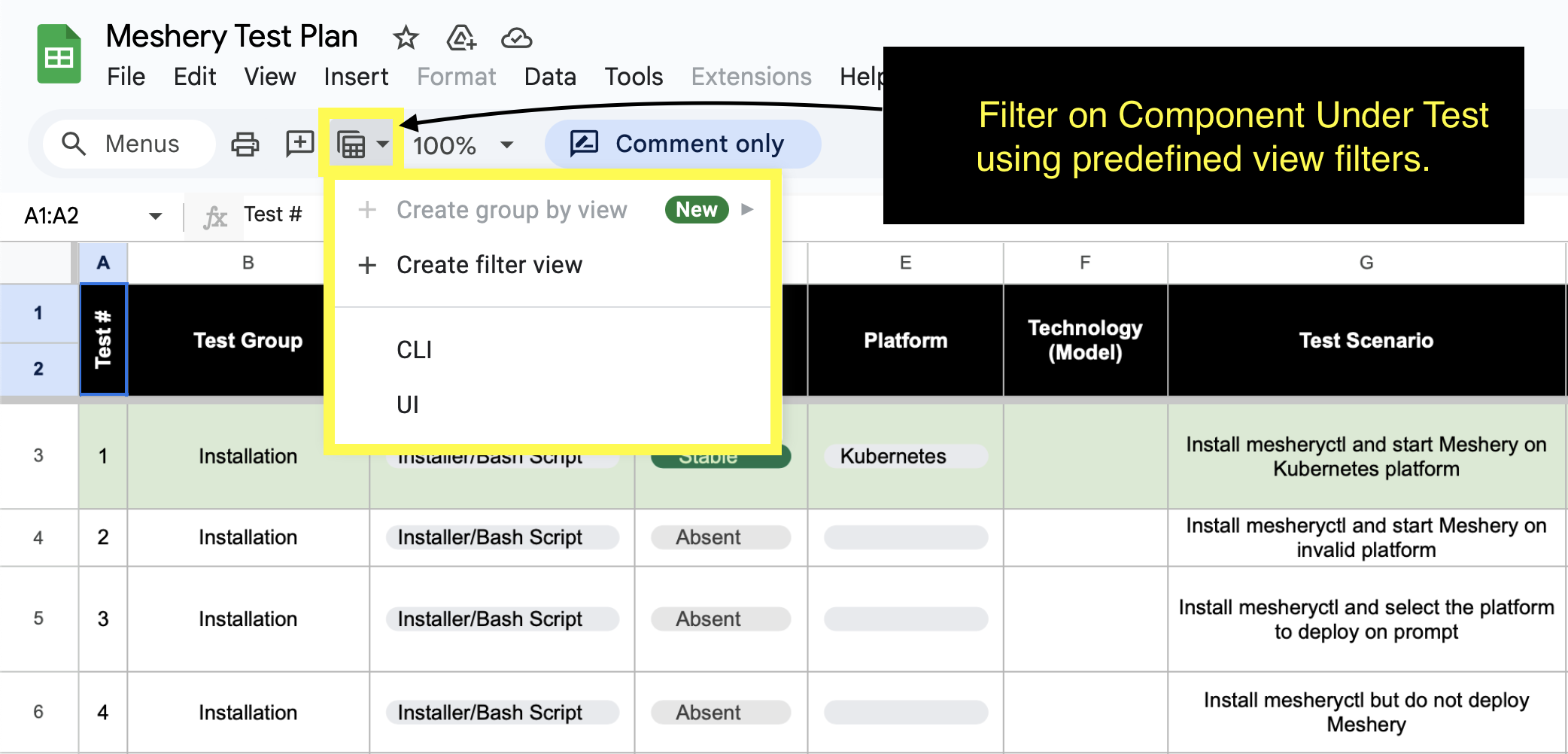
Refer to [Meshery Test Plan](https://docs.google.com/spreadsheets/d/13Ir4gfaKoAX9r8qYjAFFl_U9ntke4X5ndREY1T7bnVs/edit?usp=sharing) for test scenarios.
To filter and view only UI-related tests using the Sheet Views feature:
1. In the top menu bar, click Data → Change view
2. Choose the pre-defined view labeled "UI"
## Linking tests to the Test Plan (traceability)
To make Playwright results traceable back to the Meshery Test Plan and to group
them in the Allure report by behavior, tests are tagged with their Test Plan
identifiers. The Kubernetes Connection suite is the reference implementation.
- **`@TC-`** - the Test Plan "Test #" (column A). Reuse the existing sheet
number for the scenario; never invent one, so the UI, CLI (BATS), and
reporting lanes line up on the same id.
- **`@cut:`** - the "Component" under test (column C), slugified.
- **`@client:ui`** and **`@connections`** - client and suite selectors, so a
behavior can be run in isolation with `--grep @connections`.
The tag list and the matching Allure labels (`epic`, `feature`, `story`,
`testId`, `componentUnderTest`, `client`) are produced from a single map so the
spec stays declarative and the sheet ↔ code link lives in one place. For the
connections suite that map is
[`ui/tests/e2e/connections.testmap.ts`](https://github.com/meshery/meshery/blob/master/ui/tests/e2e/connections.testmap.ts):
		import { annotateConnCase, connTags } from './connections.testmap';

test(
  'Register and connect a Kubernetes cluster via kubeconfig upload',
  { tag: connTags('kubeconfigConnect') },
  async ({ page }, testInfo) => {
    annotateConnCase(testInfo, 'kubeconfigConnect'); // emits the shared Allure labels
    // ...
  },
);
Behaviors that do not yet have a Test Plan row use `connTagsUntracked('')`
so they still land in the report grouped by component; graduate them into the
map once a Test # is assigned. Run a single Test # with
`npx playwright test --grep @TC-1012`.